
MD-102 · Question #83
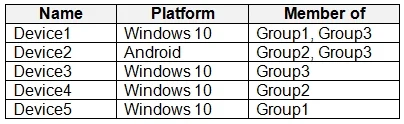
You have devices enrolled in Microsoft Intune as shown in the following table. You create an app protection policy named Policy1 that has the following settings: - Platform: Windows 10 - Protected…
The correct answer is C. Device4 and Device5 only. Only applies to 4 and 5. 'Exclude' overrides 'Apply'. 1, 2 and 3 are excluded by membership. 4 and 5 are the only ones that get it applied. Exclusion takes precedence over inclusion in the following same group type scenarios: • Including user groups and excluding user groups…
Question
You have devices enrolled in Microsoft Intune as shown in the following table. You create an app protection policy named Policy1 that has the following settings:
- Platform: Windows 10
- Protected apps: App1
- Exempt apps: App2
- Network boundary: Cloud resources, IPv4 ranges
You assign Policy1 to Group1 and Group2. You exclude Group3 from Policy1. Which devices will apply Policy1?
Exhibit
Options
- ADevice1, Device2, Device4, and Device5
- BDevice1, Device4, and Device5 only
- CDevice4 and Device5 only
- DDevice1, Device3, Device4 and Device5
How the community answered
(47 responses)- A11% (5)
- B6% (3)
- C60% (28)
- D23% (11)
Explanation
Only applies to 4 and 5. 'Exclude' overrides 'Apply'. 1, 2 and 3 are excluded by membership. 4 and 5 are the only ones that get it applied. Exclusion takes precedence over inclusion in the following same group type scenarios: • Including user groups and excluding user groups when assigning apps • Including device groups and excluding device group when assigning apps For example, if you assign a device group to the All corporate users user group, but exclude members in the Senior Management Staff user group, All corporate users except the Senior Management staff get the assignment, because both groups are user groups. https://docs.sophos.com/central/Mobile/help/en-us/esg/Sophos- Mobile/tasks/AssignUserGroupsToIntuneAppProtectionPolicy.html
Topics
Community Discussion
No community discussion yet for this question.