
MD-102 · Question #535
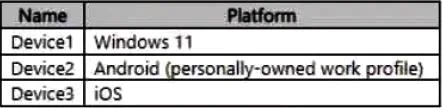
You have a Microsoft 365 subscription that contains devices enrolled in Microsoft intune as shown in the following table. You need to use a bulk device action to send custom notifications. To which…
The correct answer is C. Device3 only. In Microsoft Intune, custom notifications can be sent to iOS/iPadOS and Android devices only, appearing as push notifications through the Company Portal app or Microsoft Intune app on the user's device; macOS and Windows devices do not support custom Intune notifications. Key…
Question
You have a Microsoft 365 subscription that contains devices enrolled in Microsoft intune as shown in the following table. You need to use a bulk device action to send custom notifications. To which devices can you send the custom notifications?
Exhibit
Options
- ADevice1 only
- BDevice2 only
- CDevice3 only
- DDevice2 and Device3 only
- EDevice1, Device2, and Device3
How the community answered
(43 responses)- A5% (2)
- B7% (3)
- C72% (31)
- D2% (1)
- E14% (6)
Explanation
In Microsoft Intune, custom notifications can be sent to iOS/iPadOS and Android devices only, appearing as push notifications through the Company Portal app or Microsoft Intune app on the user's device; macOS and Windows devices do not support custom Intune notifications. Key points about Intune custom notifications: - Supported devices: iOS/iPadOS and Android - Delivery method: Push notifications through the Company Portal app or Microsoft Intune app - Not supported on: macOS and Windows - Enrolment status: MDM
Topics
Community Discussion
No community discussion yet for this question.