
MD-102 · Question #36
You have a Microsoft Azure Log Analytics workplace that collects all the event logs from the computers at your company. You have a computer named Computer1 than runs Windows 10. You need to view the…
The correct answer is A. Event. In Azure Monitor / Log Analytics, Windows event log entries are stored in the 'Event' table. To filter events from a specific computer you would run: Event | where Computer == 'Computer1'. The choices in this question contain a formatting error (A and D are both labeled…
Question
You have a Microsoft Azure Log Analytics workplace that collects all the event logs from the computers at your company. You have a computer named Computer1 than runs Windows 10. You need to view the events collected from Computer1. Which query should you run in Log Analytics?
Exhibit
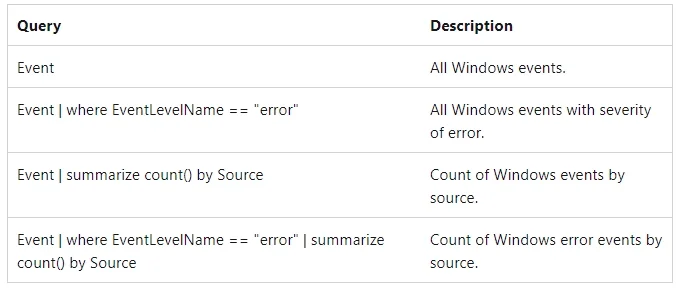
Options
- AEvent
- BETWEvent
- CETWEvent
- DEvent
How the community answered
(21 responses)- A81% (17)
- B10% (2)
- C5% (1)
- D5% (1)
Explanation
In Azure Monitor / Log Analytics, Windows event log entries are stored in the 'Event' table. To filter events from a specific computer you would run: Event | where Computer == 'Computer1'. The choices in this question contain a formatting error (A and D are both labeled 'Event'; B and C are both labeled 'ETWEvent'). ETWEvent is used for Event Tracing for Windows (ETW) telemetry, not standard Windows event logs. The correct query uses the Event table (choice A).
Topics
Community Discussion
No community discussion yet for this question.