
MD-102 · Question #295
You have computer that run Windows 10 and connect to an Azure Log Analytics workspace. The workspace is configured to collect all available events from Windows event logs. The computers have the…
The correct answer is D. 1, 2, and 4 on. Azure Monitor / Log Analytics collects Windows event log entries based on the event level configured. When configured to collect 'all available events,' it collects Error, Warning, and Information level events from the selected channels (e.g., System, Application). Verbose and…
Question
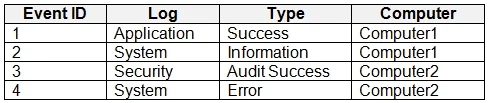
You have computer that run Windows 10 and connect to an Azure Log Analytics workspace. The workspace is configured to collect all available events from Windows event logs. The computers have the logged events shown in the following table. Which events are collected in the Log Analytics workspace?
Exhibit
Options
- A1 only
- B2 and 3 only
- C1 and 3 only
- D1, 2, and 4 on
- E1, 2, 3, and 4
How the community answered
(22 responses)- A18% (4)
- B5% (1)
- C9% (2)
- D64% (14)
- E5% (1)
Explanation
Azure Monitor / Log Analytics collects Windows event log entries based on the event level configured. When configured to collect 'all available events,' it collects Error, Warning, and Information level events from the selected channels (e.g., System, Application). Verbose and Debug level events are not standard collection targets. Based on the referenced table (not visible here), events 1, 2, and 4 fall within the collectable severity levels (Error, Warning, or Information) while event 3 does not - it is likely a Verbose or Debug level entry that Log Analytics does not collect by default even with all events enabled.
Topics
Community Discussion
No community discussion yet for this question.