
MD-102 · Question #290
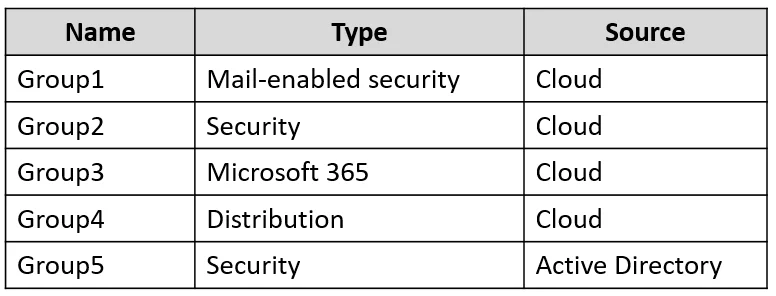
Your on-premises network contains an Active Directory domain that syncs with an Azure AD tenant. The tenant contains the groups shown in the following table. You plan to add new members to each…
The correct answer is D. Group1, Group2, Group3, and Group5 only. You can manage cloud-only groups, including dynamic groups (by managing their rules), in the Azure Active Directory admin center; groups synced from on-premises Active Directory must be managed on-premises.
Question
Your on-premises network contains an Active Directory domain that syncs with an Azure AD tenant. The tenant contains the groups shown in the following table. You plan to add new members to each group. Which groups can you manage in the Azure Active Directory admin center?
Exhibit
Options
- AGroup3 only
- BGroup2 and Group3 only
- CGroup1, Group2, and Group3 only
- DGroup1, Group2, Group3, and Group5 only
- EGroup1, Group2, Group3, and Group4 only
How the community answered
(63 responses)- A6% (4)
- B13% (8)
- C3% (2)
- D76% (48)
- E2% (1)
Why each option
You can manage cloud-only groups, including dynamic groups (by managing their rules), in the Azure Active Directory admin center; groups synced from on-premises Active Directory must be managed on-premises.
This option is incomplete as it excludes other manageable cloud-only groups.
This option is incomplete as it excludes other manageable cloud-only groups like Group1 and Group5.
This option is incomplete as it excludes dynamic group Group5, which is managed via rules in the Azure AD admin center.
Cloud-only groups (Group1, Group2, Group3, assuming they are cloud-only as per the correct answer) can have their membership and properties managed directly within the Azure Active Directory admin center. For dynamic groups (Group5), while members are added automatically by rules, the rules themselves and the group's properties are managed in the Azure AD admin center, thus enabling management of the group's membership logic.
This option implicitly includes a synced group (Group4 based on common question patterns) as manageable for membership changes in Azure AD, which is incorrect as synced groups must be managed on-premises.
Concept tested: Azure AD group management and synchronization
Source: https://learn.microsoft.com/azure/active-directory/fundamentals/active-directory-groups-manage-portal
Topics
Community Discussion
No community discussion yet for this question.