
MD-102 · Question #260
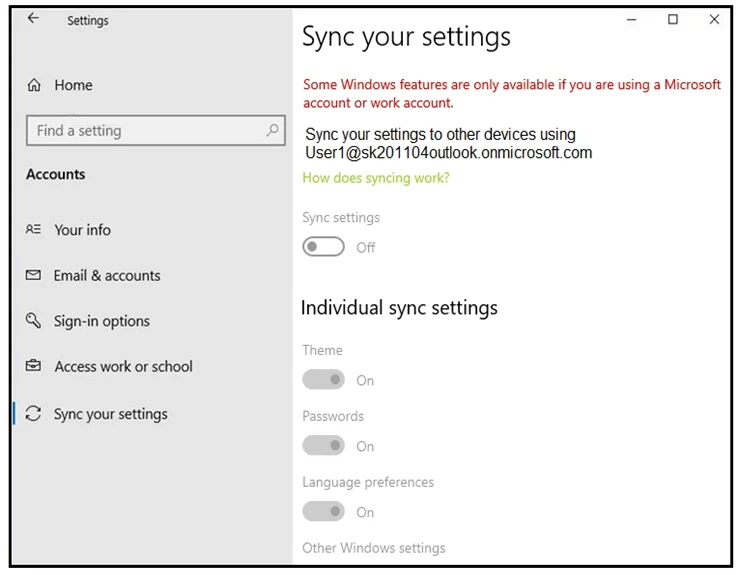
Your company has a Microsoft 365 tenant. Users sign in to Windows 10 devices by using their Microsoft 365 account. On a computer, you open Sync your settings as shown in the exhibit. You need to set…
The correct answer is D. Enable Enterprise State Roaming. Enterprise State Roaming provides users with a unified experience across their Windows devices and reduces the time needed for configuring a new device. Enterprise State Roaming operates similar to the standard consumer settings sync that was first introduced in Windows 8…
Question
Your company has a Microsoft 365 tenant. Users sign in to Windows 10 devices by using their Microsoft 365 account. On a computer, you open Sync your settings as shown in the exhibit. You need to set Sync settings to On. What should you do?
Exhibit
Options
- AEnable User Experience Virtualization (UE-V).
- BEnable Windows Mobility Center.
- CDisable Windows Hello for Business.
- DEnable Enterprise State Roaming.
How the community answered
(58 responses)- A10% (6)
- B5% (3)
- C2% (1)
- D83% (48)
Explanation
Enterprise State Roaming provides users with a unified experience across their Windows devices and reduces the time needed for configuring a new device. Enterprise State Roaming operates similar to the standard consumer settings sync that was first introduced in Windows 8. Note: To enable Enterprise State Roaming 1. Sign in to the Azure portal. 2. Browse to Azure Active Directory > Devices > Enterprise State Roaming. 3. Select Users may sync settings and app data across devices. https://docs.microsoft.com/en-us/azure/active-directory/devices/enterprise-state-roaming-enable
Topics
Community Discussion
No community discussion yet for this question.