
MD-102 · Question #24
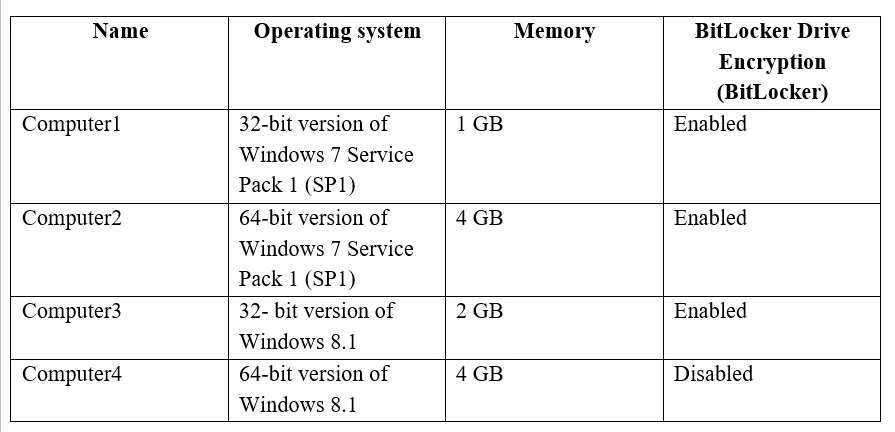
You have the 64-bit computers shown in the following table. You plan to perform an in-place upgrade to the 64-bit version of Windows 10. Which computers can you upgrade to the 64-bit version of…
The correct answer is A. Computer2 and Computer4 only. Note: Once the Windows 10 upgrade is complete the key in plain text is removed, and then BitLocker will enable again automatically. This means that the Windows 10 upgrade process on a device using BitLocker is the same to a device without using the security feature. Not…
Question
You have the 64-bit computers shown in the following table. You plan to perform an in-place upgrade to the 64-bit version of Windows 10. Which computers can you upgrade to the 64-bit version of Windows 10 in their current state?
Exhibit
Options
- AComputer2 and Computer4 only
- BComputer4 only
- CComputer3 and Computer4 only
- DComputer1, Computer2, Computer3 and Computer4
- EComputer2, Computer3, and Computer4 only
How the community answered
(30 responses)- A70% (21)
- B3% (1)
- C17% (5)
- D7% (2)
- E3% (1)
Explanation
Note: Once the Windows 10 upgrade is complete the key in plain text is removed, and then BitLocker will enable again automatically. This means that the Windows 10 upgrade process on a device using BitLocker is the same to a device without using the security feature. Not Computer1 or Computer3: Changing from Windows 7, Windows 8, or Windows 8.1 x86 to Windows 10 x64. The upgrade process cannot change from a 32-bit operating system to a 64-bit operating system, because of possible complications with installed applications and drivers. https://docs.microsoft.com/en-us/windows/deployment/windows-10-deployment-scenarios https://pureinfotech.com/upgrade-windows-10-bitlocker-enabled/
Topics
Community Discussion
No community discussion yet for this question.