
MD-102 · Question #233
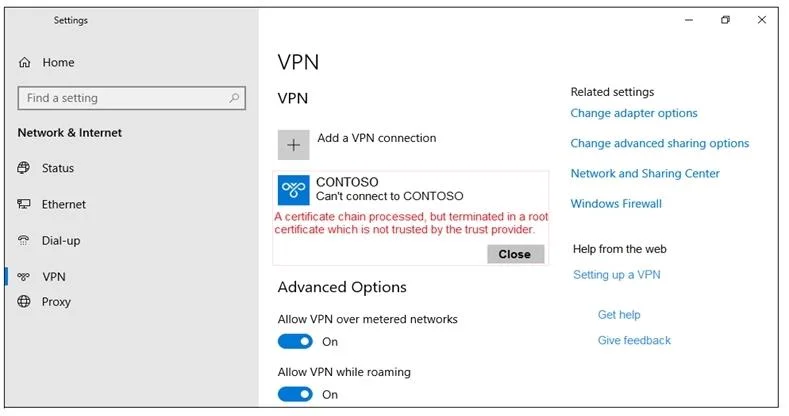
You are configuring an SSTP VPN. When you attempt to connect to the VPN, you receive the message shown in the exhibit. (Click the Exhibit tab.) What should you do to ensure that you can connect to…
The correct answer is C. Install the root certificate. Error message: A certificate chain processed, but terminated in a root certificate which is not trusted by the trust provider. We need to install a proper root certificate. Note: Each client computer that connects to a VNet using Point-to-Site must have a client certificate…
Question
You are configuring an SSTP VPN. When you attempt to connect to the VPN, you receive the message shown in the exhibit. (Click the Exhibit tab.) What should you do to ensure that you can connect to the VPN?
Exhibit
Options
- AChange the VPN type
- BGenerate a computer certificate from the root certification authority (CA)
- CInstall the root certificate
How the community answered
(67 responses)- A18% (12)
- B9% (6)
- C73% (49)
Explanation
Error message: A certificate chain processed, but terminated in a root certificate which is not trusted by the trust provider. We need to install a proper root certificate. Note: Each client computer that connects to a VNet using Point-to-Site must have a client certificate installed. You generate a client certificate from the self-signed root certificate, and then export and install the client certificate. If the client certificate is not installed, authentication fails. https://docs.microsoft.com/en-us/azure/virtual-wan/certificates-point-to-site
Topics
Community Discussion
No community discussion yet for this question.