
MD-102 · Question #203
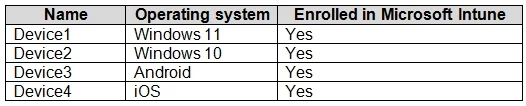
You have a Microsoft 365 E5 subscription that contains the devices shown in the following table. All devices have Microsoft Edge installed. From the Microsoft Intune admin center, you create a…
The correct answer is B. Device1 and Device2 only. Microsoft Edge Security Baselines in Intune are designed to be applied only to supported Windows operating systems.
Question
You have a Microsoft 365 E5 subscription that contains the devices shown in the following table. All devices have Microsoft Edge installed. From the Microsoft Intune admin center, you create a Microsoft Edge Baseline profile named Edge1. You need to apply Edge1 to all the supported devices. To which devices should you apply Edge1?
Exhibit
Options
- ADevice1 only
- BDevice1 and Device2 only
- CDevice1, Device2, and Device3 only
- DDevice1, Device2, and Device4 only
- EDevice1, Device2, Device3, and Device4
How the community answered
(44 responses)- B84% (37)
- C9% (4)
- D5% (2)
- E2% (1)
Why each option
Microsoft Edge Security Baselines in Intune are designed to be applied only to supported Windows operating systems.
This is incomplete, as Device2 (Windows 10) is also a supported device.
Microsoft Edge Security Baselines in Intune are specifically designed for Windows 10 and later devices, making Device1 (Windows 11) and Device2 (Windows 10) the supported platforms for applying the Edge1 profile.
Device3 (macOS) is not a supported platform for Microsoft Edge Security Baselines in Intune.
Device4 (Android) is not a supported platform for Microsoft Edge Security Baselines in Intune.
Device3 (macOS) and Device4 (Android) are not supported platforms for Microsoft Edge Security Baselines in Intune.
Concept tested: Microsoft Edge Security Baseline supported platforms
Source: https://learn.microsoft.com/en-us/mem/intune/protect/security-baselines-configure-edge
Topics
Community Discussion
No community discussion yet for this question.