
MD-102 · Question #172
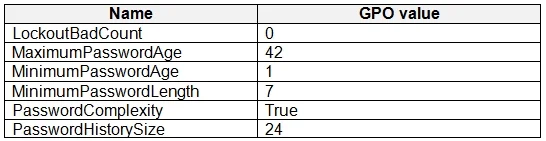
Your network contains an on-premises Active Directory domain and an Azure Active Directory (Azure AD) tenant. The Default Domain Policy Group Policy Object (GPO) contains the settings shown in the…
The correct answer is D. Device restrictions. The Default Domain Policy GPO typically contains password policies (minimum length, complexity, expiration) and account lockout policies. In Microsoft Intune, these settings map to the Device restrictions profile type, which allows you to configure password requirements…
Question
Your network contains an on-premises Active Directory domain and an Azure Active Directory (Azure AD) tenant. The Default Domain Policy Group Policy Object (GPO) contains the settings shown in the following table. You need to migrate the existing Default Domain Policy GPO settings to a device configuration profile. Which type of device configuration profile should you create?
Exhibit
Options
- ACustom
- BEndpoint protection
- CAdministrative Templates
- DDevice restrictions
How the community answered
(30 responses)- A10% (3)
- B7% (2)
- C3% (1)
- D80% (24)
Explanation
The Default Domain Policy GPO typically contains password policies (minimum length, complexity, expiration) and account lockout policies. In Microsoft Intune, these settings map to the Device restrictions profile type, which allows you to configure password requirements, account lockout thresholds, and similar security settings for Windows 10 devices. Administrative Templates (C) are used to migrate ADMX-based GPO settings (registry-backed policies). Custom profiles (A) require manual OMA-URI entries and are used when no built-in profile type covers the needed setting. Endpoint protection (B) is focused on Windows Defender, firewall, and BitLocker, not account/password policies.
Topics
Community Discussion
No community discussion yet for this question.