
MD-102 · Question #156
You have a hybrid Microsoft Azure Active Directory (Azure AD) tenant, a Microsoft System Center Configuration Manager (Current Branch) environment, and a Microsoft 365 subscription. You have…
The correct answer is D. Computer1, Computer2, and Computer3. Co-management in Microsoft Endpoint Manager (Configuration Manager + Intune/Device Management) requires: (1) Windows 10 version 1709 or later, (2) the device is hybrid Azure AD joined or Azure AD joined, and (3) the Configuration Manager client is installed. All three computers…
Question
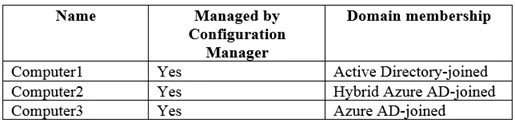
You have a hybrid Microsoft Azure Active Directory (Azure AD) tenant, a Microsoft System Center Configuration Manager (Current Branch) environment, and a Microsoft 365 subscription. You have computers that run Windows 10 as shown in the following table. You plan to use Microsoft 365 Device Management. Which computers support co-management by Configuration Manager and Device Management?
Exhibit
Options
- AComputer3 only
- BComputer1 and Computer2 only
- CComputer2 only
- DComputer1, Computer2, and Computer3
How the community answered
(26 responses)- A8% (2)
- B4% (1)
- C15% (4)
- D73% (19)
Explanation
Co-management in Microsoft Endpoint Manager (Configuration Manager + Intune/Device Management) requires: (1) Windows 10 version 1709 or later, (2) the device is hybrid Azure AD joined or Azure AD joined, and (3) the Configuration Manager client is installed. All three computers in the table meet these prerequisites, making Computer1, Computer2, and Computer3 all eligible for co-management.
Topics
Community Discussion
No community discussion yet for this question.