
MD-102 · Question #137
You have a Microsoft 365 subscription. You have a conditional access policy that requires multi-factor authentication (MFA) for users in a group name Sales when the users sign in from a trusted…
The correct answer is D. a grant control. In Azure AD Conditional Access, 'Grant controls' define what a user must satisfy to be allowed access (e.g., require MFA, require a compliant device, require hybrid Azure AD join). 'Conditions' determine when the policy triggers (location, device platform, sign-in risk, etc.)…
Question
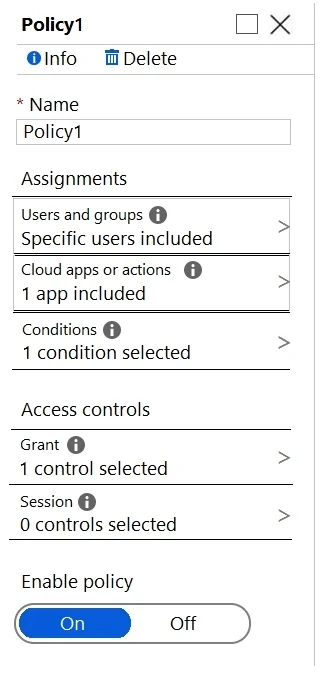
You have a Microsoft 365 subscription. You have a conditional access policy that requires multi-factor authentication (MFA) for users in a group name Sales when the users sign in from a trusted location. The policy is configured as shown in the exhibit. (Click the Exhibit tab.) You create a compliance policy. You need to ensure that the users are authenticated only if they are using a compliant device. What should you configure in the conditional access policy?
Exhibit
Options
- Aa condition
- Ba session control
- Ca cloud app
- Da grant control
How the community answered
(43 responses)- A5% (2)
- B9% (4)
- C2% (1)
- D84% (36)
Explanation
In Azure AD Conditional Access, 'Grant controls' define what a user must satisfy to be allowed access (e.g., require MFA, require a compliant device, require hybrid Azure AD join). 'Conditions' determine when the policy triggers (location, device platform, sign-in risk, etc.). 'Session controls' limit what users can do within an app (e.g., app-enforced restrictions). 'Cloud apps' define which applications the policy applies to. To enforce that only compliant devices can authenticate, you must configure a Grant control - specifically 'Require device to be marked as compliant' - not a condition or session control.
Topics
Community Discussion
No community discussion yet for this question.