
MD-102 · Question #128
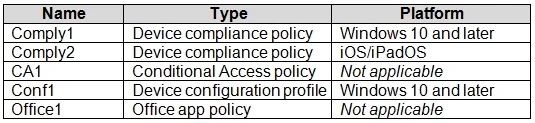
You have a Microsoft Intune deployment that contains the resources shown in the following table. You create a policy set named Set1 and add Comply1 to Set1. Which additional resources can you add to…
The correct answer is C. Comply2 and Conf1 only. Intune Policy Sets support a defined set of resource types: device compliance policies, device configuration profiles, app protection policies, app configuration policies, apps, and enrollment restrictions. Since Set1 already contains Comply1 (a compliance policy), you can also…
Question
You have a Microsoft Intune deployment that contains the resources shown in the following table. You create a policy set named Set1 and add Comply1 to Set1. Which additional resources can you add to Set1?
Exhibit
Options
- AConf1 only
- BComply2 only
- CComply2 and Conf1 only
- DCA1, Conf1, and Office1 only
- EComply2, CA1, Conf1, and Office1
How the community answered
(51 responses)- A12% (6)
- B2% (1)
- C57% (29)
- D6% (3)
- E24% (12)
Explanation
Intune Policy Sets support a defined set of resource types: device compliance policies, device configuration profiles, app protection policies, app configuration policies, apps, and enrollment restrictions. Since Set1 already contains Comply1 (a compliance policy), you can also add Comply2 (another compliance policy) and Conf1 (a device configuration profile). Conditional Access policies (CA1) are managed in Azure AD and cannot be added to Intune policy sets. Office1, if representing a Microsoft 365 Apps assignment outside supported types, is also excluded. Therefore, only Comply2 and Conf1 can be added.
Topics
Community Discussion
No community discussion yet for this question.