
MD-102 · Question #124
Case Study 1 - Litware inc General Overview Litware, Inc. is an international manufacturing company that has 3,000 employees. The company has sales, marketing, research, human resources (HR)…
The correct answer is B. Enterprise State Roaming. Enterprise State Roaming (ESR) is the correct solution. ESR allows users' Windows settings and application data to sync across devices via Azure AD, which is especially valuable for the Los Angeles developers who work flexible hours and may use different machines. Unlike folder…
Question
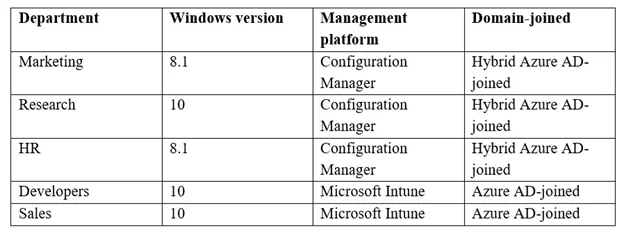
Case Study 1 - Litware inc General Overview Litware, Inc. is an international manufacturing company that has 3,000 employees. The company has sales, marketing, research, human resources (HR), development, and IT departments. Litware has two main offices in New York and Los Angeles. Litware has five branch offices in Asia. Existing Environment Current Business Model The Los Angeles office has 500 developers. The developers work flexible hours ranging from 11:00 to 22:00. Litware has a Microsoft System Center 2012 R2 Configuration Manager deployment. During discovery, the company discovers a process where users are emailing bank account information of its customers to internal and external recipients. Current Environment The network contains an Active Directory domain that is synced to Microsoft Azure Active Directory (Azure AD). The functional level of the forest and the domain is Windows Server 2012 R2. All domain controllers run Windows Server 2012 R2. Litware has the computers shown in the following table. The development department uses projects in Azure DevOps to build applications. Most of the employees in the sales department are contractors. Each contractor is assigned a computer that runs Windows 10. At the end of each contract, the computer is assigned to different contractor. Currently, the computers are re-provisioned manually by the IT department. Problem Statements Litware identifies the following issues on the network:
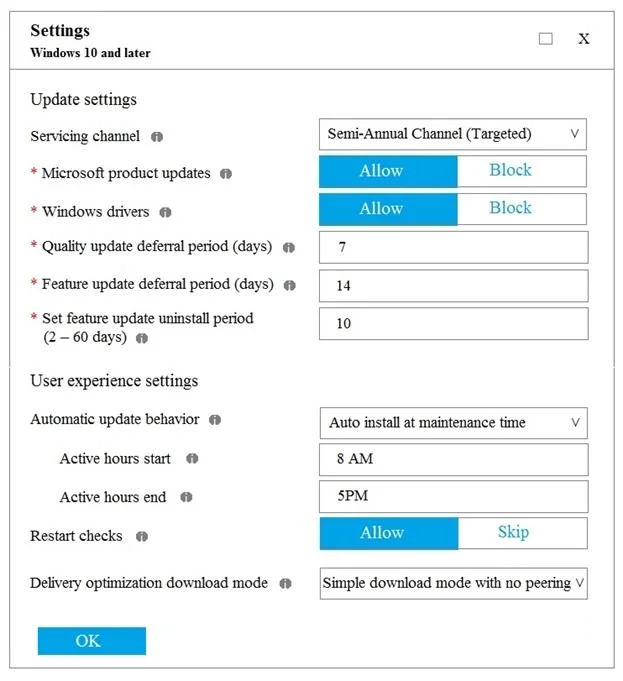
- Employees in the Los Angeles office report slow Internet performance when updates are
downloading. The employees also report that the updates frequently consume considerable resources when they are installed. The Update settings are configured as shown in the Updates exhibit. (Click the Updates button.)
- Management suspects that the source code for the proprietary applications in Azure DevOps in
being shared externally.
- Re-provisioning the sales department computers is too time consuming.
Requirements Business Goals Litware plans to transition to co-management for all the company-owned Windows 10 computers. Whenever possible, Litware wants to minimize hardware and software costs. Device Management Requirements Litware identifies the following device management requirements:
- Prevent the sales department employees from forwarding email that contains bank account
information.
- Ensure that Microsoft Edge Favorites are accessible from all computers to which the developers
sign in.
- Prevent employees in the research department from copying patented information from trusted
applications to untrusted applications. Technical Requirements Litware identifies the following technical requirements for the planned deployment:
- Re-provision the sales department computers by using Windows AutoPilot.
- Ensure that the projects in Azure DevOps can be accessed from the corporate network only.
- Ensure that users can sign in to the Azure AD-joined computers by using a PIN. The PIN must
expire every 30 days.
- Ensure that the company name and logo appears during the Out of Box Experience (OOBE)
when using Windows AutoPilot. You need to meet the device management requirements for the developers. What should you implement?
Exhibits
Options
- Afolder redirection
- BEnterprise State Roaming
- Cknown folder redirection in Microsoft OneDrive
- Dhome folders
How the community answered
(28 responses)- A7% (2)
- B86% (24)
- C4% (1)
- D4% (1)
Explanation
Enterprise State Roaming (ESR) is the correct solution. ESR allows users' Windows settings and application data to sync across devices via Azure AD, which is especially valuable for the Los Angeles developers who work flexible hours and may use different machines. Unlike folder redirection (A) or home folders (D), ESR syncs OS and UWP app settings - not just files - without requiring on-premises infrastructure. Known folder redirection via OneDrive (C) redirects Documents/Desktop/Pictures folders but does not sync Windows settings or Edge data. ESR is the purpose-built Azure AD feature for roaming settings across corporate devices.
Topics
Community Discussion
No community discussion yet for this question.