
MD-102 · Question #119
You have a Microsoft 365 subscription. All devices run Windows 10. You need to prevent users from enrolling the devices in the Windows Insider Program. What two configurations should you perform…
The correct answer is C. a custom device configuration profile D. a Windows 10 and later update ring. Two methods can prevent users from enrolling in the Windows Insider Program via Intune: (C) A custom device configuration profile using the OMA-URI './Vendor/MSFT/Policy/Config/System/AllowBuildPreview' set to 0 explicitly blocks access to Insider Preview builds. (D) A Windows…
Question
You have a Microsoft 365 subscription. All devices run Windows 10. You need to prevent users from enrolling the devices in the Windows Insider Program. What two configurations should you perform from the Microsoft Intune admin center? Each correct answer is a complete solution. NOTE: Each correct selection is worth one point.
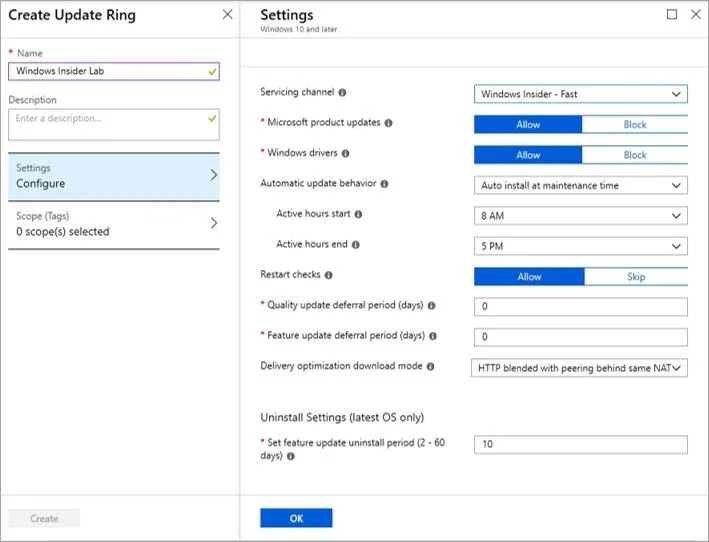
Exhibit
Options
- Aa Windows 10 security baseline
- Ban app configuration policy
- Ca custom device configuration profile
- Da Windows 10 and later update ring
- Ea device restrictions device configuration profile
How the community answered
(21 responses)- A5% (1)
- B5% (1)
- C76% (16)
- E14% (3)
Explanation
Two methods can prevent users from enrolling in the Windows Insider Program via Intune: (C) A custom device configuration profile using the OMA-URI './Vendor/MSFT/Policy/Config/System/AllowBuildPreview' set to 0 explicitly blocks access to Insider Preview builds. (D) A Windows 10 and later update ring can be configured with the 'Windows Insider build channel' set to 'Not configured' while disabling preview builds, effectively blocking Insider enrollment. Option A (security baseline) does not include an Insider Program setting, Option B (app config policy) applies to apps not OS settings, and Option E (device restrictions) does not directly expose an Insider Program block control.
Topics
Community Discussion
No community discussion yet for this question.