
MCD-LEVEL-1 · Question #36
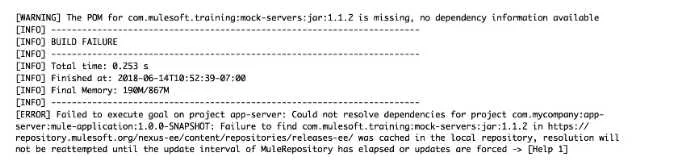
Refer to the exhibit. The error occurs when a project is run in Anypoint Studio. The project, which has a dependency that is not in the MuleSoft Maven repository, was created and successfully run on…
The correct answer is B. Install the dependency to the computer's local Maven repository. As dependency is not present in Mulesoft Maven repository, we need to install the dependency on computer's local Maven repository. https://docs.mulesoft.com/mule-runtime/4.3/maven-reference
Question
Refer to the exhibit. The error occurs when a project is run in Anypoint Studio. The project, which has a dependency that is not in the MuleSoft Maven repository, was created and successfully run on a different computer. What is the next step to fix the error to get the project to run successfully?
Exhibit
Options
- AEdit the dependency in the Mule project's pom.xml file
- BInstall the dependency to the computer's local Maven repository
- CDeploy the dependency to MuleSoft's Maven repository
- DAdd the dependency to the MULE_HOME/bin folder
How the community answered
(43 responses)- A2% (1)
- B84% (36)
- C5% (2)
- D9% (4)
Explanation
As dependency is not present in Mulesoft Maven repository, we need to install the dependency on computer's local Maven repository. https://docs.mulesoft.com/mule-runtime/4.3/maven-reference
Topics
Community Discussion
No community discussion yet for this question.