
MCD-LEVEL-1 · Question #190
Refer to the exhibits. The mule application is debugged in Anypoint Studio and stops at the breakpoint as shown in below exhibit. What is the value of the payload displayed in the debugger at this…
The correct answer is A. Start. Setting Breakpoints To set breakpoints, right-click a building block, then select Toggle Breakpoint. Studio applies a red dot to the building block's icon on the canvas. When you run your application in Debug mode, Studio stops the flow execution at the breakpoint you have set…
Question
Refer to the exhibits. The mule application is debugged in Anypoint Studio and stops at the breakpoint as shown in below exhibit. What is the value of the payload displayed in the debugger at this breakpoint?
Exhibit
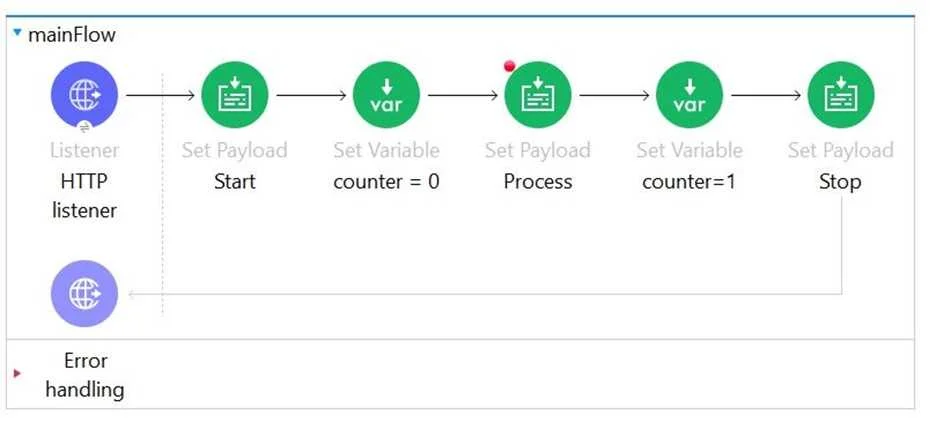
Options
- AStart
- BProcess
- CFinished
- DPayload is always empty at the breakpoint
How the community answered
(22 responses)- A86% (19)
- B5% (1)
- C9% (2)
Explanation
Setting Breakpoints To set breakpoints, right-click a building block, then select Toggle Breakpoint. Studio applies a red dot to the building block's icon on the canvas. When you run your application in Debug mode, Studio stops the flow execution at the breakpoint you have set, allowing you to check the Mule Event content in the Mule Debugger View.
Topics
Community Discussion
No community discussion yet for this question.