
Microsoft
MB6-704 · Question #4
You have a menu item named menuiteml that isused to launch a form named Forml by using the rich client. You need to ensure that users who are granted the Maintain customer addresses privilege can…
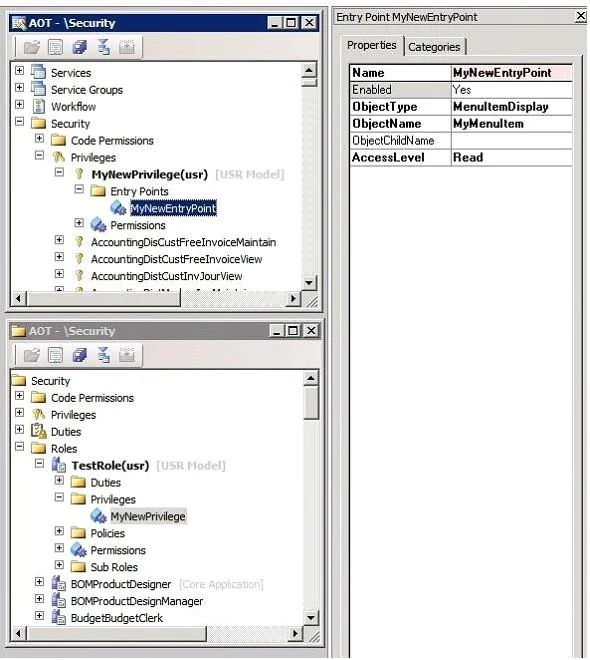
The correct answer is B. Create an entry pointfor the Maintain customer addresses privilege. The developer does the following: Creates a form and a menu item for a form. Creates a privilege and an entry point. Creates a test role for the application user. (see 4d below) Create a Privilege and an Entry Point You can create a privilege and an entry point for MyMenuItem…
inventory configuration
Question
You have a menu item named menuiteml that isused to launch a form named Forml by using the rich client. You need to ensure that users who are granted the Maintain customer addresses privilege can use menuiteml to open Forml in read mode. What should you do?
Exhibit
Options
- ASet menuiteml to run on the server.
- BCreate an entry pointfor the Maintain customer addresses privilege.
- CCreate an entry point for the Maintain customer addresses privilege.
- DSet menuiteml to run on the server.
- ESet the Name property to MyNewEntryPoint.
- FMake the ObjectType of the entry point be MenuItemDisplay. c. Make the ObjectName of the
- GSet the AccessLevel of the entry point to Read.
How the community answered
(31 responses)- A6% (2)
- B77% (24)
- C10% (3)
- F3% (1)
- G3% (1)
Explanation
- The developer does the following: Creates a form and a menu item for a form. Creates a privilege and an entry point. Creates a test role for the application user. * (see 4d below) Create a Privilege and an Entry Point You can create a privilege and an entry point for MyMenuItem by following these steps: 1. Create a privilege that is named MyNewPrivilege. 2. Expand AOT > Security > Privileges > MyNewPrivilege. 3. Add an entry point that is named MyNewEntryPoint. You do this by right-clicking the Entry Points node, and then clicking New Entry Point. 4. In the Properties window for the new entry point, do the following: entry point be MyMenuItem. Create a Test Role To properly test your form as an application user, you must create a test role. You can create a test role by following these steps: 1. Create a test role for an application user that is named TestRole. 2. Expand AOT > Security > Roles > TestRole > Privileges. 3. Add MyNewPrivilege privilege to the Privileges node of TestRole. The following figure shows a test role with a privilege that you create in this walkthrough.
Topics
#security privileges#entry points#user permissions#read access
Community Discussion
No community discussion yet for this question.