
MB3-700 · Question #18
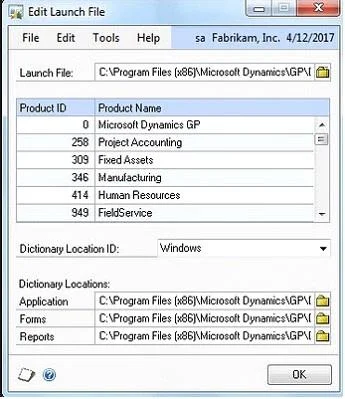
Which two statements about the Edit Launch File window are true? (Each correct answer presents a complete solution. Choose two.)
The correct answer is A. It allows a user to change the location of a forms and/or reports dictionary to a network share. B. It allows a user to view the products installed on the Microsoft Dynamics GP client. When GP and any associated 3rd party applications are installed, a file is created called Dynamics.set, aka the Launch File. The Launch File contains instructions as to which products to initiate when starting GP and where the applications, forms, and reports dictionaries are…
Question
Which two statements about the Edit Launch File window are true? (Each correct answer presents a complete solution. Choose two.)
Exhibit
Options
- AIt allows a user to change the location of a forms and/or reports dictionary to a network share.
- BIt allows a user to view the products installed on the Microsoft Dynamics GP client.
- CIt allows a user to view products installed on other Microsoft Dynamics GP workstations.
- DIt allows a user to install new Microsoft Dynamics GP modules onto the workstation.
How the community answered
(20 responses)- A75% (15)
- C10% (2)
- D15% (3)
Explanation
When GP and any associated 3rd party applications are installed, a file is created called Dynamics.set, aka the Launch File. The Launch File contains instructions as to which products to initiate when starting GP and where the applications, forms, and reports dictionaries are stored. Should you need to edit this file, for instance, to change the location of the reports dictionary to a shared directory, go Administration>System>Edit Launch File
Topics
Community Discussion
No community discussion yet for this question.