
Microsoft
MB2-868 · Question #36
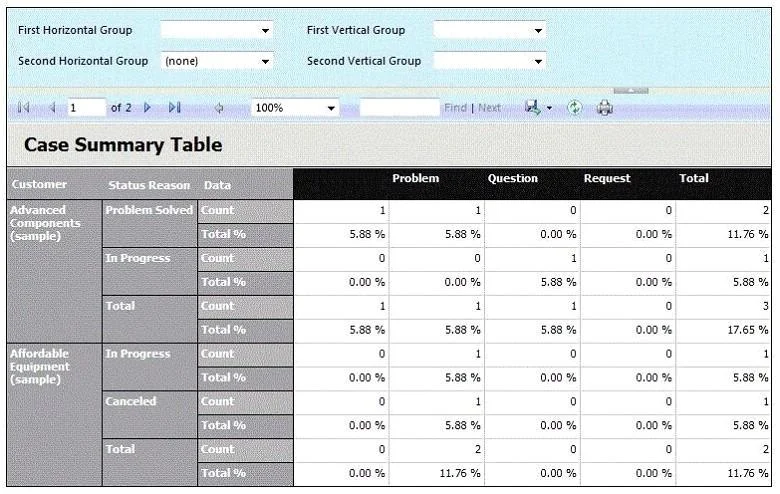
You need to configure the Case Summary Table report for all customers and cases as shown in the exhibit by setting the vertical and horizontal groups. (Click the Exhibit button.) What should you do?
The correct answer is A. Clear existing filters. See the full explanation below for the reasoning.
Question
You need to configure the Case Summary Table report for all customers and cases as shown in the exhibit by setting the vertical and horizontal groups. (Click the Exhibit button.) What should you do?
Exhibit
Options
- AClear existing filters.
- BClear existing filters.
- CSet Customer as the First Vertical Group, set Status Reason as the Second Vertical Group,
- DSet Severity as the First Vertical Group, set Customer as the First Horizontal Group, and set
How the community answered
(58 responses)- A72% (42)
- B14% (8)
- C5% (3)
- D9% (5)
Community Discussion
No community discussion yet for this question.