
MB-920 · Question #181
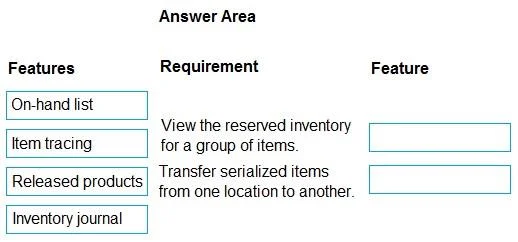
Drag and Drop Question A company transfers inventory that is available on-hand from one warehouse to another. The company needs to: - Identify inventory reserved for customers. - Transfer the…
This question tests knowledge of Microsoft Dynamics 365 Supply Chain Management inventory management features, specifically how to identify customer-reserved inventory and how to physically move remaining inventory between warehouse locations.
Question
Exhibit
Explanation
This question tests knowledge of Microsoft Dynamics 365 Supply Chain Management inventory management features, specifically how to identify customer-reserved inventory and how to physically move remaining inventory between warehouse locations.
Approach. Inventory Marking is the correct feature to identify inventory reserved for customers. Marking creates a direct link between supply (on-hand inventory) and specific demand transactions (such as sales orders), making it possible to see exactly which inventory is committed/reserved for particular customers. Transfer Orders are the correct feature for moving the remaining (unmarked/unreserved) inventory from one warehouse to another. A Transfer Order is a formal warehouse document in D365 SCM that records the shipment and receipt of inventory between internal warehouse locations, maintaining proper inventory accounting throughout the process.
Concept tested. Microsoft Dynamics 365 Supply Chain Management - Inventory Management: understanding the distinction between Inventory Marking (tracing and linking inventory to specific customer demand) and Transfer Orders (inter-warehouse inventory movement). This is a core topic in the MB-330 (D365 Supply Chain Management Functional Consultant) certification exam.
Reference. Microsoft Learn – MB-330: Dynamics 365 Supply Chain Management – Inventory Management module; 'Configure and manage inventory management in Dynamics 365 Supply Chain Management'
Topics
Community Discussion
No community discussion yet for this question.