
MB-920 · Question #137
A company with multiple legal entities is using Dynamics 365 Supply Chain Management for its supply chain operations. A production engineer wants to specify a specific legal entity and page to use…
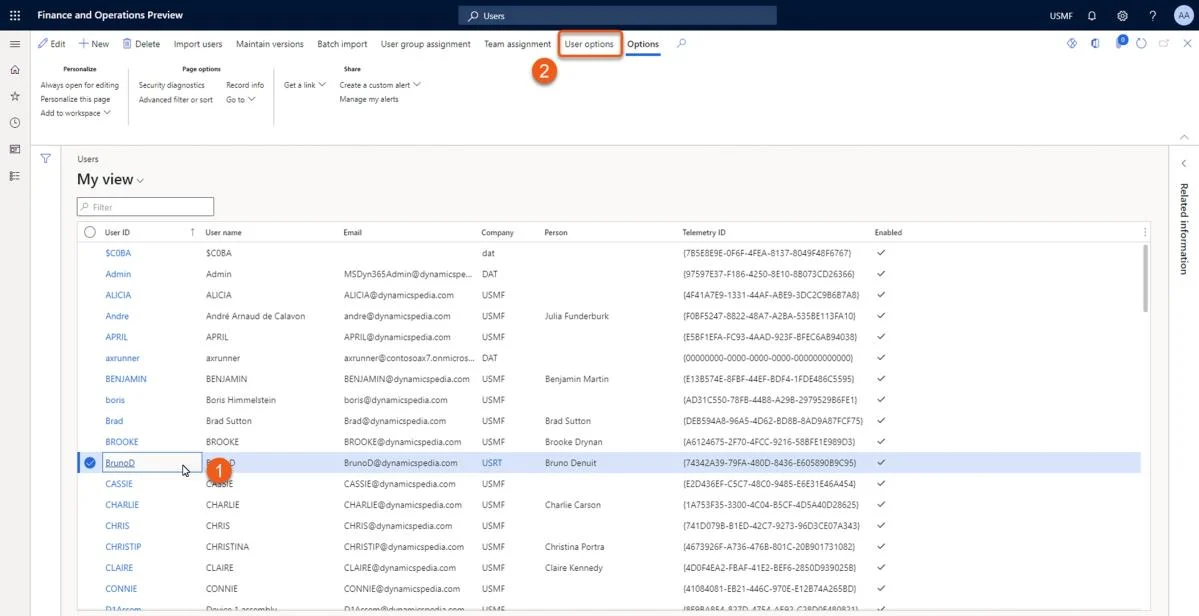
The correct answer is E. User options. How can a system administrator change user options for a specific user? Manage user options The steps are quite easy. 1. Navigate to System administration > Users. 2. Select a user for whom the options needs to be managed. 3. On the Action menu bar, click User options. 4. Now…
Question
Exhibit
Options
- AProduction control parameters
- BSecurity roles
- CWeb browser settings
- DLegal entity parameters
- EUser options
How the community answered
(30 responses)- A3% (1)
- C7% (2)
- E90% (27)
Explanation
How can a system administrator change user options for a specific user? Manage user options The steps are quite easy. 1. Navigate to System administration > Users. 2. Select a user for whom the options needs to be managed. 3. On the Action menu bar, click User options. 4. Now you can manage settings for the selected user like setting a startup company and language. Via the action menu bar, you can also manage the Usage data. Mass update user options Some information available on the User options page can be updated via the Excel add-in or Microsoft Power Automate. A data entity has been provided by Microsoft out of the box. With help of the User information data entity, you can mass update data. https://community.dynamics.com/blogs/post/?postid=f177245b-46b4-436b-82b5-1a4743f177bd https://learn.microsoft.com/en-us/dynamics365/supply-chain/warehousing/mobile-device-user-
Topics
Community Discussion
No community discussion yet for this question.