
MB-820 · Question #127
You develop an extension for the newest release of Business Central online. You have a customer who has an earlier on-premises release of Business Central. The extension must be deployed to the…
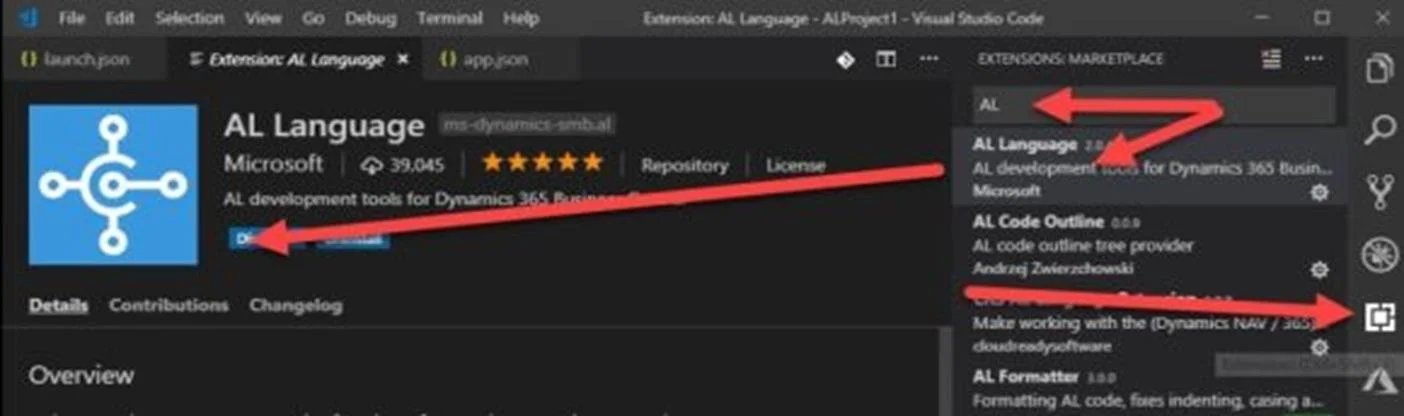
The correct answer is A. Replace the latest version of the AL Language extension with the needed earlier version. How Do I: Develop an Extension in Business Central On Premises? Once Visual Studio Code has been installed (next, next, next,…), launch it and open the Extensions pane: At the top, search for AL, then the AL Language Extension should popup in the list. Select it and install it…
Question
You develop an extension for the newest release of Business Central online. You have a customer who has an earlier on-premises release of Business Central. The extension must be deployed to the customer's environment. You need to deploy the extension to the older Business Central version. What should you do?
Exhibit
Options
- AReplace the latest version of the AL Language extension with the needed earlier version.
- BUninstall the AL Language extension and install the AL Language extension from the Business
- CChange the Runtime property value of the app.json file of the app.
How the community answered
(27 responses)- A93% (25)
- B4% (1)
- C4% (1)
Explanation
How Do I: Develop an Extension in Business Central On Premises? Once Visual Studio Code has been installed (next, next, next,…), launch it and open the Extensions pane: At the top, search for AL, then the AL Language Extension should popup in the list. Select it and install it. After installation, you will be asked to Reload: https://thinkaboutit.be/2018/11/how-do-i-develop-an-extension-in-business-central-on-premises/
Topics
Community Discussion
No community discussion yet for this question.