nerdexam
Microsoft

MB-800 · Question #177

Drag and Drop Question A company uses Dynamics 365 Business Central. The company bills thousands of sales invoices for recurring subscription services on a monthly basis. You need to ensure…

The correct answer is Open the Customer List page and select the customer for recurring billing services. Then, on the Customer Card page, open the Rec. Sales Line.; Assign the Standard Sales Lines Card to recurring subscription services.; Update the inert Rec. Lines on orders on invoices to Automatic.; Run the Create Recurring Sales Invoices task batch job. Dynamics 365 Business Central - Recurring Sales Invoices Setup Overview of the Process Recurring invoices in Business Central rely on Standard Sales Lines (pre-defined line templates) assigned to customers, with an automation setting that lets a batch job generate invoices…

Sales

Question

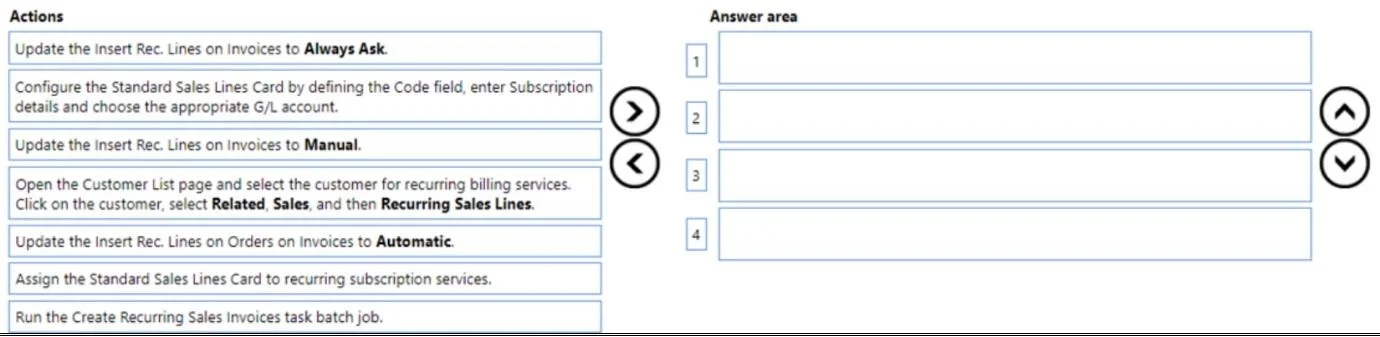
Drag and Drop Question A company uses Dynamics 365 Business Central. The company bills thousands of sales invoices for recurring subscription services on a monthly basis. You need to ensure recurring sales invoices are automatically created for the same subscription services. Which four actions should you perform in sequence? To answer, move the appropriate actions from the list of actions to the answer area and arrange them in the correct order. Answer:

Exhibit
MB-800 question #177 exhibit

Answer Area

Drag items

Update the inert Rec. Lines on invoices to Always Ask.Configure the Standard Sales Lines Card by defining the Code field, enter subscription details and choosing the appropriate G/L Account.Update the inert Rec. Lines on invoices to Manual.Open the Customer List page and select the customer for recurring billing services. Then, on the Customer Card page, open the Rec. Sales Line.Update the inert Rec. Lines on orders on invoices to Automatic.Assign the Standard Sales Lines Card to recurring subscription services.Run the Create Recurring Sales Invoices task batch job.

Correct arrangement

  • Open the Customer List page and select the customer for recurring billing services. Then, on the Customer Card page, open the Rec. Sales Line.
  • Assign the Standard Sales Lines Card to recurring subscription services.
  • Update the inert Rec. Lines on orders on invoices to Automatic.
  • Run the Create Recurring Sales Invoices task batch job.

Explanation

Dynamics 365 Business Central - Recurring Sales Invoices Setup

Overview of the Process

Recurring invoices in Business Central rely on Standard Sales Lines (pre-defined line templates) assigned to customers, with an automation setting that lets a batch job generate invoices without manual intervention. The four steps follow a strict dependency chain: you must exist in the right place before you can configure it, configure before you can automate, and automate before you can run the job.


Step-by-Step Breakdown

Step 1: Open the Customer List → select the customer → open Rec. Sales Line

This must come first because everything else is customer-specific configuration. You cannot assign recurring lines or set automation behavior without first navigating to the correct Customer Card. The Rec. Sales Lines subpage is only accessible from within the Customer Card - it's the anchor point for all subsequent steps.

Misconception: Some candidates think you start by creating or configuring the Standard Sales Lines Card. That's a prerequisite that's assumed to exist already (or done separately). The question's scope is the automation setup for a specific customer, not the initial template creation.


Step 2: Assign the Standard Sales Lines Card to recurring subscription services

Once you're on the customer's Rec. Sales Lines page (opened in Step 1), you assign the pre-existing Standard Sales Lines code to that customer. This links the subscription line items (G/L account, quantity, description) to the customer record so the batch job knows what to invoice.

Misconception: "Configure the Standard Sales Lines Card" (the distractor) looks like it belongs here or before Step 1. It is excluded because it's a prior setup task, not part of the per-customer automation sequence. Mixing it in breaks the logical flow.


Step 3: Update the Rec. Lines insertion setting to Automatic

With the Standard Sales Lines assigned, you now set how they are applied. The Automatic option tells Business Central to insert the recurring lines without any user prompt when the batch job runs. The other two options are wrong for this scenario:

OptionBehaviorWhy wrong here
ManualUser must trigger insertion themselvesDefeats the automation goal
Always AskPrompts the user each timeRequires human interaction; not scalable for thousands of invoices

Automatic is the only option that supports unattended, mass creation of invoices.

Misconception: Candidates sometimes confuse "Automatic" with "Always Ask" thinking a confirmation step adds safety. For batch processing thousands of invoices, prompting defeats the entire purpose.


Step 4: Run the Create Recurring Sales Invoices batch job

This is the execution step. Only after the customer is configured (Steps 1–3) can the batch job do its work - it scans customers flagged with Automatic, reads their assigned Standard Sales Lines, and generates the invoices. Running this before Steps 1–3 would produce nothing for this customer.

Misconception: Some candidates think this step could come earlier or be optional. It is the only mechanism that actually creates the invoices - without running the batch job, no invoices are generated regardless of how the customer is configured.


Why the Excluded Options Are Wrong

DistractorWhy excluded
Configure the Standard Sales Lines CardA prerequisite, not part of the per-customer automation sequence
Update Rec. Lines to ManualOpposite of automation
Update Rec. Lines to Always AskRequires user interaction; incompatible with batch processing

Key Takeaway

The sequence follows a strict navigate → assign → configure → execute pattern. Each step unlocks the next: you can't assign without navigating, can't set Automatic without assigning, and the batch job is meaningless without the preceding configuration.

Topics

#recurring sales invoices#standard sales lines#subscription billing#automated invoicing

Community Discussion

No community discussion yet for this question.

Full MB-800 Practice