
Microsoft
MB-500 · Question #395
After you answer a question in this section, you will NOT be able to return to it. As a result, these questions will not appear in the review screen. A company is automating manual processes in the…
The correct answer is A. Yes. Create a batch job to have an active period of AFTERHOURS and a batch job recurrence of Daily. Select the Every Weekday setting, and set the batch job to run as part of BATCHGROUP1. Create a batch job to have an active period of AFTERHOURS and a batch job recurrence of Daily…
Develop business logic
Question
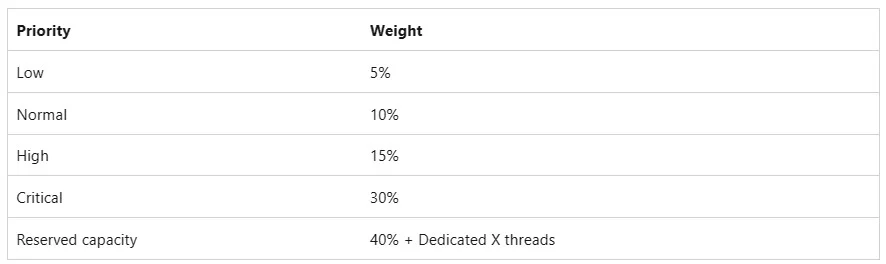
After you answer a question in this section, you will NOT be able to return to it. As a result, these questions will not appear in the review screen. A company is automating manual processes in the Dynamics 365 finance and operations apps. The company has the following batch groups and priorities configured: The batch processes run during the following times of day: The company requires a process that meets the following requirements: - Runs every weekday. - Runs outside of work hours. - Runs with at least a high priority. You need to automate the manual process. Solution: Create a batch job to have an active period of AFTERHOURS and a batch job recurrence of Daily. Select the Every Weekday setting, and set the batch job to run as part of BATCHGROUP1. Does the solution meet the goal?
Exhibit
Options
- AYes
- BNo
How the community answered
(30 responses)- A80% (24)
- B20% (6)
Explanation
- Create a batch job to have an active period of AFTERHOURS and a batch job recurrence of Daily. Select the Every Weekday setting, and set the batch job to run as part of BATCHGROUP1. * Create a batch job to have an active period of AFTERHOURS and a batch job recurrence of Daily. Set the batch job to run as part of BATCHGROUP2. * Create a batch job to have an active period of AFTERHOURS and a recurrence of Daily. Select the Every Weekday setting, and set the batch job to run as part of BATCHGROUP2. * Create a batch job to have a recurrence of Daily, and select the Every Weekday setting. Set the batch job to run as part of BATCHGROUP2. You need to specify that it should only run on weekdays. The priority for BATCHGROUP2 is High. The correct solution would set the batch job to run as part of BATCHGROUP1, which has the priority of normal. Note on Batch Priority: Note on Active batch periods: With the release of Platform update 21, an additional level of control over when batch jobs execute is now available. Previously, it was only possible to schedule a batch job to execute every hour for a specified number of hours or until a given date. Administrators can now provide information for an additional active period, such as in the following scenarios: Specifying time ranges during which jobs within a batch group can start execution. Selecting to run batch jobs outside of office hours only. Setting the recurrence for anytime within the active period. For example, your administrator might select to run the batch jobs every hour, but only between the hours of 6:00 PM and 8:00 AM. https://learn.microsoft.com/en-us/dynamics365/fin-ops-core/dev-itpro/sysadmin/priority-based- batch-scheduling https://learn.microsoft.com/en-us/dynamics365/fin-ops-core/dev-itpro/sysadmin/activeperiod
Topics
#batch framework#batch scheduling#batch priority#process automation
Community Discussion
No community discussion yet for this question.