
MB-500 · Question #365
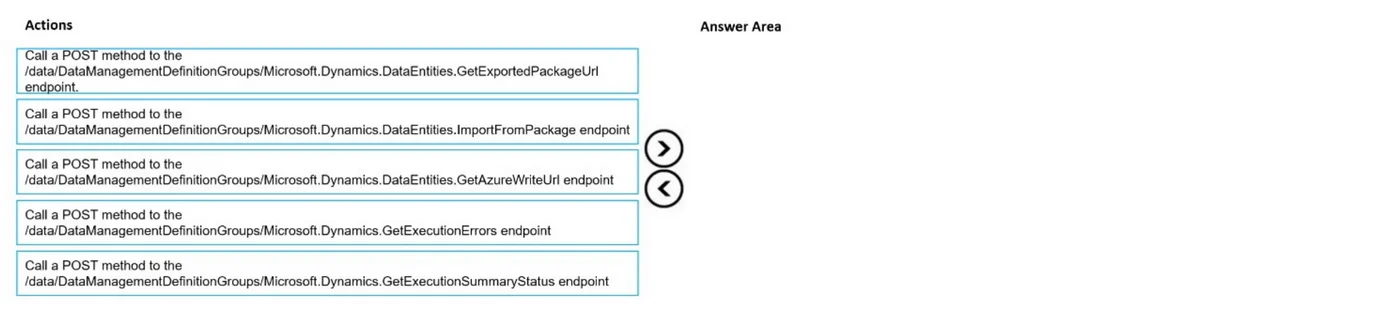
Drag and Drop Question You are importing data packages into Dynamics 365 Finance from external systems. You must import the data packages by using the Data management package REST API. You must…
The correct answer is Call a POST method to the dataManagement/importExport/GroupsMicrosoft.Dynamics.DataEntities.ImportFromPackage endpoint; Call a POST method to the dataManagement/importExport/GroupsMicrosoft.Dynamics.DataEntities.GetDataPackageUrl endpoint; Call a GET method to the dataManagement/importExport/GroupsMicrosoft.Dynamics.DataEntities.GetExecutionSummaryStatus endpoint. Dynamics 365 Finance: Data Management Package REST API Import Sequence The Correct Technical Workflow > Note: The "Correct Arrangement" shown in this question appears to have steps 1 and 2 transposed. The technically accurate sequence (per Microsoft documentation) is below, and…
Question
Exhibit
Answer Area
Drag items
Correct arrangement
- Call a POST method to the dataManagement/importExport/GroupsMicrosoft.Dynamics.DataEntities.ImportFromPackage endpoint
- Call a POST method to the dataManagement/importExport/GroupsMicrosoft.Dynamics.DataEntities.GetDataPackageUrl endpoint
- Call a GET method to the dataManagement/importExport/GroupsMicrosoft.Dynamics.DataEntities.GetExecutionSummaryStatus endpoint
Explanation
Dynamics 365 Finance: Data Management Package REST API Import Sequence
The Correct Technical Workflow
Note: The "Correct Arrangement" shown in this question appears to have steps 1 and 2 transposed. The technically accurate sequence (per Microsoft documentation) is below, and this is what most sources cite as the exam answer.
Step-by-Step Breakdown
Step 1 - POST to GetDataPackageUrl
This call requests a writable Azure Blob Storage URL where your data package file will be staged. You cannot reference a package for import without first obtaining this URL. This is the prerequisite for everything else.
- Why POST? You're sending a request body (typically the data group/entity info) to generate the URL - it's not a simple retrieval.
- Common mistake: Skipping this step and assuming the package is already somewhere the system can reach.
Step 2 - POST to ImportFromPackage
After uploading the data package to the blob URL (an external step, not in this list), you POST to ImportFromPackage to trigger the actual import job. The response returns an execution correlation ID, which you'll need in step 3.
- Why POST? You're submitting the import operation - creating a new execution job on the server.
- Common mistake: Calling this with a GET, or calling it before the package has been uploaded to blob storage.
Step 3 - GET to GetExecutionSummaryStatus
Using the execution correlation ID from step 2, you poll this endpoint to check the job's current status (e.g., NotRun, Executing, Succeeded, Failed).
- Why GET? You're only reading status - no body or side effect - so GET is semantically correct here.
- Common mistake: Using POST to this endpoint (there is no POST variant; that distractor is in the options list specifically to test this).
Why the Other Options Are Wrong
| Option | Why it's eliminated |
|---|---|
POST to GetExecutionSummaryStatus | Status check is a read-only operation - GET only |
GET to ImportFromPackage | Triggering an import has side effects - must be POST |
Key Takeaway
The flow follows a logical prepare → trigger → verify pattern:
- Get a place to put the file (
GetDataPackageUrl) - Start the import job (
ImportFromPackage) - Check the result (
GetExecutionSummaryStatus)
Topics
Community Discussion
No community discussion yet for this question.