
MB-500 · Question #272
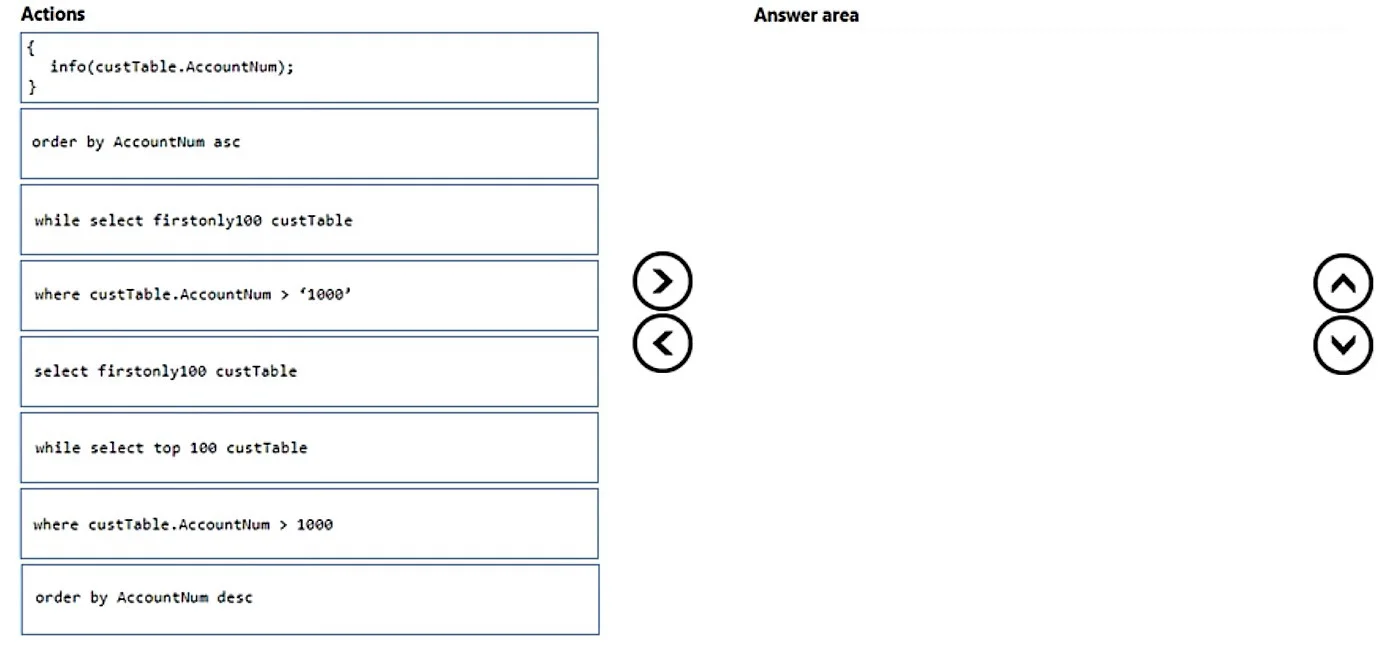
Drag and Drop Question You use Dynamics 365 Finance. You must loop through the customers table and display in the UI the customer account numbers that meet the following requirements: - Include the…
The correct answer is while select firstonly100 custtable; order by AccountNum desc; where custtable.AccountNum > '1000'; Actions { info(custtable.AccountNum); }. X++ SQL Select Statement - Explanation The X++ Select Syntax Pattern X++ (the language for Dynamics 365 Finance) has its own SQL-like syntax that differs from standard T-SQL. The structure follows this rigid order: ``xpp while select [modifiers] TableVariable order by Field…
Question
Exhibit
Answer Area
Drag items
Correct arrangement
- while select firstonly100 custtable
- order by AccountNum desc
- where custtable.AccountNum > '1000'
- Actions { info(custtable.AccountNum); }
Explanation
X++ SQL Select Statement - Explanation
The X++ Select Syntax Pattern
X++ (the language for Dynamics 365 Finance) has its own SQL-like syntax that differs from standard T-SQL. The structure follows this rigid order:
while select [modifiers] TableVariable
    order by Field [asc|desc]
    where TableVariable.Field condition
{
    // action body
}
Item-by-Item Breakdown
1. while select firstonly100 custtable
Why first: This is the loop declaration - it must open the statement. while select creates an iterating loop that processes one record per iteration until no records remain. Without while, a plain select would execute only once (fetching a single record) and not loop.
firstonly100 is an X++ keyword modifier that caps the result set at 100 records. This is not the same as T-SQL's TOP 100 - using top 100 (a distractor option) is invalid X++ syntax and would cause a compile error.
2. order by AccountNum desc
Why second: In X++ select syntax, order by always comes before where. This is the opposite of standard SQL (WHERE ... ORDER BY). Placing it after where would be a syntax error.
desc is required because the requirement is "larger to smaller." asc (ascending, small to large) is the wrong direction and is a deliberate distractor in this question.
3. where custtable.AccountNum > '1000'
Why third: The where clause always follows order by in X++ syntax. It filters rows before they enter the loop body. Note the value '1000' is a string literal (quoted) because AccountNum is a string field in D365 Finance, not an integer.
4. The Action Block { info(custtable.AccountNum); }
Why last: This is the loop body - the code that executes for each matched record. info() displays a message in the Infolog (the D365 UI message panel). It must follow the select/order/where clauses because it is syntactically the body of the while loop.
Common Mistakes to Avoid
| Mistake | Why it's wrong |
|---|---|
Using select firstonly100 without while | Only fetches one record; doesn't loop |
Using while select top 100 | top 100 is T-SQL syntax, not valid X++ |
Using order by AccountNum asc | Ascending = small to large; requirement is large to small |
Putting where before order by | X++ requires order by → where order, opposite of SQL |
The key takeaway: X++ select syntax is not standard SQL - the clause order (order by before where) and keywords (firstonly100, not TOP) are unique to the language.
Topics
Community Discussion
No community discussion yet for this question.