
MB-500 · Question #252
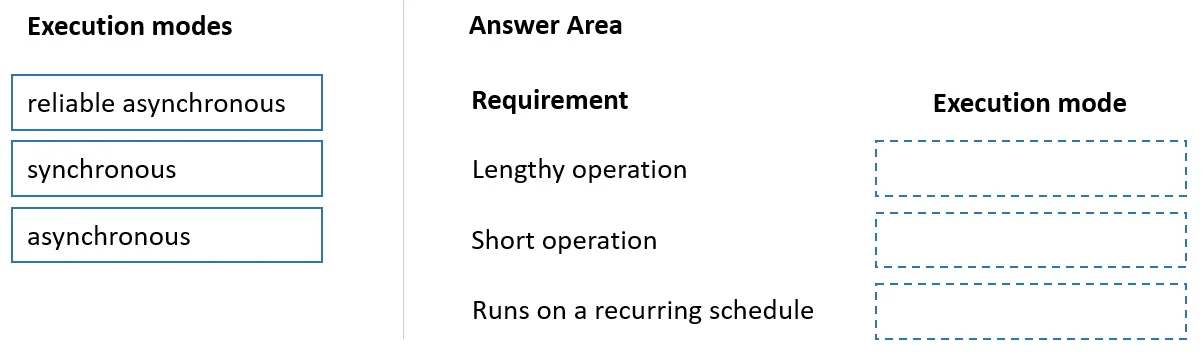
Drag and Drop Question A company uses Dynamics 365 Finance. You implement the SysOperation framework to create the following batch processes. You need to configure the execution mode for each batch…
The correct answer is asynchronous; synchronous; reliable asynchronous. SysOperation Framework Execution Modes - Explained The SysOperation framework in Dynamics 365 Finance offers three execution modes. The correct mapping (positions 1→2→3) is: --- Position 1 → Asynchronous What it does: Fires the operation on a separate thread; the caller is not…
Question
Exhibit
Answer Area
Drag items
Correct arrangement
- asynchronous
- synchronous
- reliable asynchronous
Explanation
SysOperation Framework Execution Modes - Explained
The SysOperation framework in Dynamics 365 Finance offers three execution modes. The correct mapping (positions 1→2→3) is:
Position 1 → Asynchronous
What it does: Fires the operation on a separate thread; the caller is not blocked and continues immediately. No retry or recovery guarantee.
Why it fits here: This position typically maps to a requirement like "run a background process where the user doesn't need to wait, and occasional failure is acceptable." The key trait is non-blocking without a reliability requirement - the process runs best-effort.
Common mistake: Confusing this with Reliable Asynchronous. The difference is durability - plain Asynchronous has no batch server backing, so if the AOS crashes mid-execution, the job is simply lost.
Position 2 → Synchronous
What it does: Runs on the same thread as the caller. Execution blocks until the operation completes before returning control.
Why it fits here: This position typically maps to a requirement like "the result must be available immediately before the calling code proceeds" - e.g., a calculation whose output feeds the next step in a dialog or report. The caller must wait.
Common mistake: Using Synchronous for long-running jobs. It blocks the UI/session thread, causing timeouts for heavy workloads. It's only appropriate for fast, in-session operations.
Position 3 → Reliable Asynchronous
What it does: Queues the operation through the batch server, making it durable. If the AOS goes down, the batch framework retries the job. Provides full tracking, logging, and retry semantics.
Why it fits here: This position maps to "a critical batch process that must be guaranteed to complete" - financial postings, data migrations, period close jobs. The word reliable signals the batch server's fault-tolerance is required.
Common mistake: Thinking this is just "slower Asynchronous." Reliable Asynchronous is architecturally different - it persists the job to the batch table, enabling retry and monitoring. Use it whenever failure of the operation has business consequences.
Quick Reference
| Mode | Blocking? | Fault-tolerant? | Use when… |
|---|---|---|---|
| Synchronous | Yes | No | Fast ops, result needed immediately |
| Asynchronous | No | No | Background, loss-tolerant |
| Reliable Asynchronous | No | Yes | Critical batch, must complete |
The progression moves from blocking → non-blocking → non-blocking + durable, which is the core concept the exam tests.
Topics
Community Discussion
No community discussion yet for this question.