Case Study 3 - Munson's Pickles and Preserves Farm Background Munson's Pickles and Preserves Farm produces and sells jarred food goods. The organization has several production and warehouse…
The correct answer is Refresh the entity list from the Data management workspace.; In the Data entities list, select Modify target mapping for the custom data entity.; Generate the correct target field mapping. Explanation: Table Extension Sync + Data Management Mapping Sequence What the question is really asking After extending WHSTmpStatusChange (adding EcoResProductName and Batch ID) and performing a build + database sync, the Data Management workspace still has stale entity…
Implement data and application integration
Question
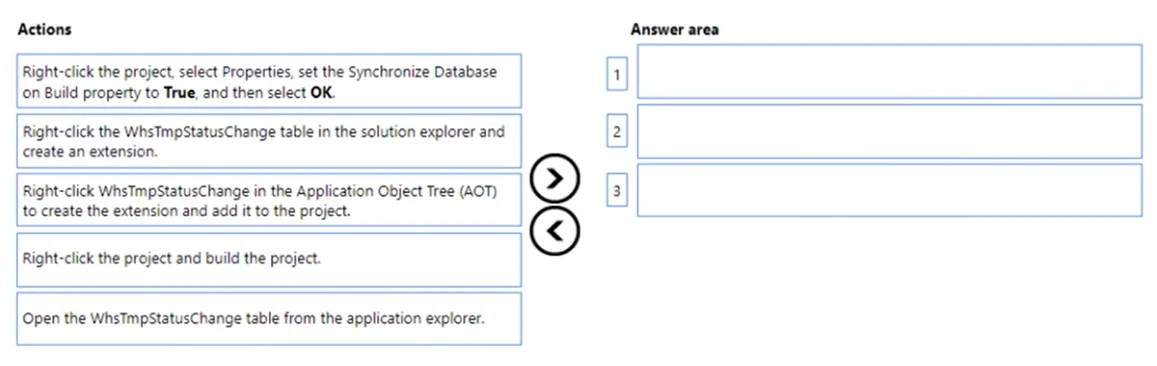
Case Study 3 - Munson's Pickles and Preserves Farm Background Munson's Pickles and Preserves Farm produces and sells jarred food goods. The organization has several production and warehouse locations across the United States. Each location runs both production and warehousing operations. The company has three locations: East, Central, and West. The company is upgrading its Dynamics AX 2009 system to Dynamics 365 Finance. Current environment General Munson's Pickles and Preserves Farm plans to migrate customizations, data, and integration from its legacy system into Dynamics 365 finance and operations apps. The Dynamics 365 finance and operations environment includes: - multiple cloud-hosted development environments using Microsoft Visual Studio 2017 - a Microsoft Azure DevOps project for source control - two tier 2 environments for user acceptance testing and staging, as well as production Munson's Pickles and Preserves Farm is currently in the planning and development phase of the upgrade process. The company's internal development team needs additional development resources to address issues. The company already created a project that is set up to use a custom model named GPExtensions. Integrations Munson's Pickles and Preserves Farm has a new integration for its freight processing information. The internal development team created the secure file transfer protocol (SFTP) site for the source information to be stored and the staging table to house the source information once the data is added to Dynamics 365 Finance. Information from the source will be transferred once a day from the source system and integrated with the target system. More than 10,000 records will be transferred over the integration. The company created an aggregate entity for the integration to minimize the amount of transmitted data. Munson's Pickles and Preserves Farm has added a new integration for freight processing where all item weights, dimensions, and other factors will be configured in the external portal while planning the loads. Once the load is planned, it will be integrated into Dynamics 365 finance and operations apps for the freight invoice processing to occur. No duplicate invoices or posting are associated with the freight invoice charges. The integration of this information from the source system is intended only for report creation and compilation purposes. Planned changes Munson's Pickles and Preserves Farm wants to change inventory forms to fit its current needs. Any modifications or enhancements must follow the existing functionality for forms in Dynamics 365 Finance. Requirements Integrations All data from integrations have the same format as an existing Dynamics 365 Finance apps field. All enhancements or customizations must use existing assets before creating new functionality. Munson's Pickles and Preserves Farm wants to change its integration strategy to include real- time data from the freight processing source system. The inventory must update as it is sold from the system. That information will be updated in Dynamics 365 Finance. The freight processing integration requires the use of an SFTP site to store XML files from the source system. The additional integration will use OData and must be transferred in real time. A periodic batch job must: - Pull data from the SFTP site. - Import the data to a staging table used to hold the information from the source system. - Map source data to the target table in Dynamics 365 Finance. The imported Load ID field must be added to the Sales Order header for all processed orders. Additional requirements for integrations, including other integration strategies, may be necessary as the company grows. Existing tables must be changed to include the Load ID. The database will need to be synched before adding the Load ID field. Changes Munson's Pickles and Preserves Farm must change the Inventory Status form to include more columns. It plans to create a table to enter the data for the Inventory Status form as a new data source. The company wants to add both the Product Name field and Batch ID field to this new table. The current form includes the item number, location, license plate, product inventory dimensions, and quantity. The grid on the Inventory Status form must include the product name by using the item number and legal entity. The user interface must be created to include the new columns and the data must be available to add to the grid. The form must have only an Action Pane, a Navigation List, a List Style Grid, a Details Header, and a Details Tab in the design and include the Load ID field. Munson's Pickles and Preserves Farm is currently in the process of adding the other required fields: one for Product Name and one for Batch ID. The new fields must be related to extended data types for the original fields on the existing data source for the Inventory Status form. Munson's Pickles and Preserves Farm plans to add the EcoResProductName and Batch ID data to the extended table for WHSTmpStatusChange. The fields on the table extension must be populated with data and visible on the Inventory Status form on insert. Issues - The internal development team has created the SFTP site connections, the staging table, and the batch jobs for the new integration for freight processing. The development team needs to map the source data to the target table and the data management workspace. The development team notices errors with mapping target fields in the data management workspace. The team needs another developer to configure the table extensions, class extensions, and form extensions that are required for the planned changes. - The internal development team has issues adding the required fields to the Inventory Status standard form. The team needs another developer to configure the table extensions, class extensions, and form extensions that are required for the planned changes. Question Drag and Drop Question You need to create an extension of the table and perform a build and synchronize the newly extended table. Which three actions should you perform in sequence? to answer, move the appropriate actions from the list of actions to the answer area and arrange them in the correct order. Answer:
Exhibit
Answer Area
Drag items
In the Data entities list, select Modify target mapping for the custom data entity.Refresh the entity list from the Data management workspace.In the Data entities list, select Target fields for the custom data entity.Publish the entity.Generate the correct target field mapping.Validate data management from the Data management workspace.
Correct arrangement
Refresh the entity list from the Data management workspace.
In the Data entities list, select Modify target mapping for the custom data entity.
Generate the correct target field mapping.
Explanation
Explanation: Table Extension Sync + Data Management Mapping Sequence
What the question is really asking
After extending WHSTmpStatusChange (adding EcoResProductName and Batch ID) and performing a build + database sync, the Data Management workspace still has stale entity metadata. The three steps fix that. This is about resolving the mapping errors the development team encountered in the data management workspace - not about initial setup.
The Correct Sequence - Step by Step
Step 1: Refresh the entity list from the Data management workspace
Why first: A build + database sync updates the database schema, but the Data Management workspace caches its own entity metadata separately. After syncing, the workspace doesn't automatically detect the new fields from your table extension. You must explicitly refresh the entity list to force the workspace to re-read the updated entity definition.
If you skip this, the new fields simply won't exist in the workspace's view - you'll be working against stale data, and the next steps will either fail or show incomplete fields.
Step 2: In the Data entities list, select Modify target mapping for the custom data entity
Why second: Once the entity list is refreshed and the workspace knows about the new fields, you navigate to your data entity and open Modify target mapping. This opens the mapping designer where source fields are mapped to target (Dynamics 365) fields.
This must come after the refresh - without it, the new fields from your extension won't appear in the mapping designer at all.
Step 3: Generate the correct target field mapping
Why third: From inside the Modify target mapping interface, you use the Generate action to auto-map the source fields to the updated target table fields. This resolves the mapping errors the team was seeing by creating correct mappings for the newly added columns.
This is the final step because you need to be inside the mapping designer (Step 2) before you can generate mappings.
Why the other options are excluded
Option
Why it's wrong here
Select Target fields
This is a read-only view of what fields exist on the entity. It doesn't let you fix or create mappings. Confusing this with "Modify target mapping" is the most common mistake.
Publish the entity
Publishing exposes an entity to OData consumers. This scenario is about fixing internal Data Management workspace mapping, not OData publishing.
Validate data management
Validation checks configuration health but is not part of the remediation sequence for mapping errors after a table extension.
Key Misconceptions to Avoid
"Target fields" ≠ "Modify target mapping" - Target fields is read-only inspection. Modify target mapping is where actual changes happen.
Don't skip the refresh - The most common real-world mistake. The sync alone does not update the workspace metadata.
Generate comes after opening the mapping designer, not before. You can't generate what the system can't see yet.
Topics
#data entity mapping#target field mapping#data management workspace#entity list refresh