
MB-500 · Question #171
Drag and Drop Question A company uses Dynamics 365 finance and operations apps. The company plans to integrate third-party products with Dynamics 365 Finance. You need to select the appropriate data…
The correct answer is OData; Custom service; Batch data API. Dynamics 365 Finance: Data Integration Options - Explained The question maps three scenarios to three integration patterns. Since the scenarios aren't quoted in your prompt, I'll explain each option and the scenario type that drives each placement. --- Position 1 → OData What…
Question
Exhibit
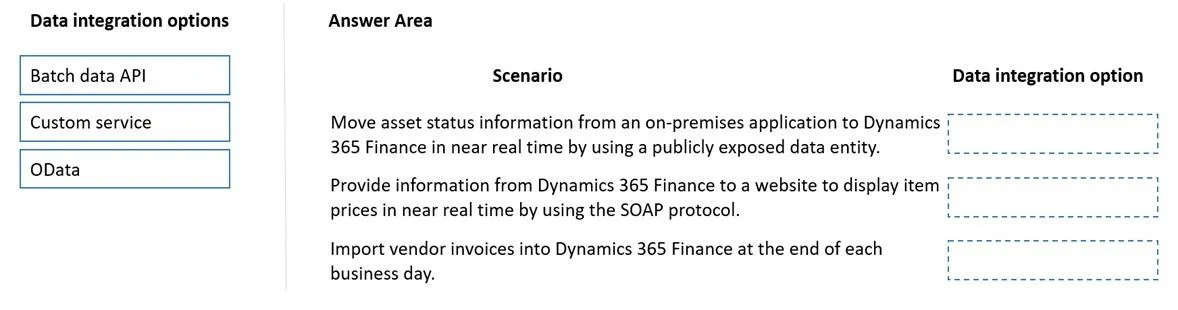
Answer Area
Drag items
Correct arrangement
- OData
- Custom service
- Batch data API
Explanation
Dynamics 365 Finance: Data Integration Options - Explained
The question maps three scenarios to three integration patterns. Since the scenarios aren't quoted in your prompt, I'll explain each option and the scenario type that drives each placement.
Position 1 → OData
What it is: A REST-based protocol that exposes standard Dynamics 365 data entities for synchronous, real-time CRUD operations (Create, Read, Update, Delete).
Scenario it fits: A third-party app needs to read or write individual records in real time using standard data entities - e.g., querying customer records, updating an address, or fetching a product list interactively.
Why OData: It's designed for synchronous, record-level access to pre-built data entities. It's the natural fit when the integration doesn't need custom logic, just standard entity data, right now.
Common mistake: Choosing OData for bulk data loads. OData is not optimized for high-volume batch operations - it will be slow and may hit throttling limits.
Position 2 → Custom Service
What it is: A custom SOAP or REST endpoint you build in X++ to expose specific business logic.
Scenario it fits: A third-party app needs to trigger a specific business process or complex operation that standard entities don't expose - e.g., posting a journal entry, executing a workflow action, or running a custom calculation.
Why Custom Service: When the integration requires business logic execution (not just data read/write), and OData's standard entities can't fulfill it, a custom service lets you expose that logic as a callable endpoint.
Common mistake: Confusing this with OData. OData exposes data; Custom Service exposes behavior/logic. If the scenario mentions invoking a process rather than querying data, Custom Service is the answer.
Position 3 → Batch Data API
What it is: The Data Management Framework (DMF) REST API, used for asynchronous, high-volume data imports and exports via data packages.
Scenario it fits: A third-party system needs to import or export large volumes of data (thousands of records) - e.g., nightly bulk import of sales orders, migrating vendor master data, or exporting financial transactions for reporting.
Why Batch Data API: It's built for scale and async processing. You submit a data package, D365 processes it in a batch job, and you poll for completion. It handles volume that would overwhelm OData.
Common mistake: Choosing OData for bulk imports. OData is synchronous and row-by-row - it becomes a bottleneck at scale. Batch Data API is always the right answer when "volume," "bulk," or "asynchronous" appears in the scenario.
Summary Table
| Position | Option | Key Signal in Scenario |
|---|---|---|
| 1 | OData | Real-time, record-level, standard entity CRUD |
| 2 | Custom Service | Business logic, custom process, not a standard entity |
| 3 | Batch Data API | Large volume, bulk, asynchronous, import/export |
The core mental model: OData = data now, Custom Service = logic now, Batch Data API = data at scale, async.
Topics
Community Discussion
No community discussion yet for this question.