
MB-500 · Question #149
Drag and Drop Question An error occurs when an employee creates a new workflow using a custom approval element to track the status of a document. You need to ensure that the workflow is created…
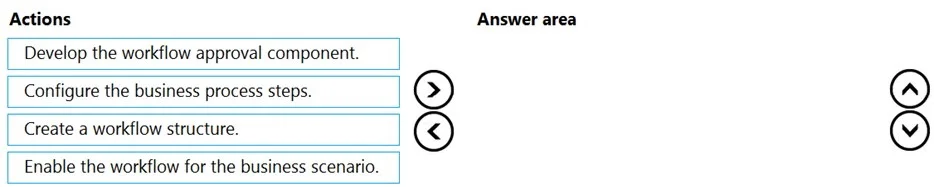
The correct answer is Create a workflow structure.; Configure the business process steps.; Develop the workflow approval component.; Enable the workflow for the business scenario. Workflow Creation Order - Explained The Core Logic Building a workflow follows the same principle as constructing a building: foundation first, details second, decoration third, open doors last. Each step depends on the previous one existing before it can be built…
Question
Exhibit
Answer Area
Drag items
Correct arrangement
- Create a workflow structure.
- Configure the business process steps.
- Develop the workflow approval component.
- Enable the workflow for the business scenario.
Explanation
Workflow Creation Order - Explained
The Core Logic
Building a workflow follows the same principle as constructing a building: foundation first, details second, decoration third, open doors last. Each step depends on the previous one existing before it can be built.
Step-by-Step Breakdown
1. Create a workflow structure
This is the container - the skeleton of the entire workflow. Without a defined structure, there is nowhere to attach steps, components, or configurations. Think of it as creating the project file before writing any code. Every subsequent action depends on this existing first.
2. Configure the business process steps
Now that the structure exists, you define what the workflow actually does - the sequence of actions, routing conditions, approvers, and decision logic. This must come before building custom components because the steps define what the component needs to accomplish. You cannot build a tool without first knowing its purpose.
3. Develop the workflow approval component
The custom approval element is built after the process steps are defined, because the component must align with the specific requirements those steps established. Building the component before configuring steps is a common mistake - it leads to mismatches that cause exactly the kind of errors described in the question.
4. Enable the workflow for the business scenario
Activation is always last. Enabling a workflow makes it live and available to end users. Doing this before development is complete would expose a broken or incomplete workflow to production processes.
Common Mistakes
| Mistake | Why It Fails |
|---|---|
| Developing the component first | You're building without a defined requirement - the component won't match the process steps |
| Enabling before developing | Activates an incomplete workflow, causing runtime errors |
| Configuring steps before creating the structure | Steps have no container to live in |
The error in the question (employee creates the workflow incorrectly) most likely stems from building or enabling before the foundation and process steps were properly established.
Topics
Community Discussion
No community discussion yet for this question.