
MB-330 · Question #412
Drag and Drop Question A company is implementing Dynamics 365 Supply Chain Management. The company has a history of incorrect inventory valuation reporting due to non-existence of a proper cycle…
The correct answer is Blind cycle counting; Spot cycle counting. Dynamics 365 SCM Cycle Counting - Explanation > Note: The question as presented omits the actual use case descriptions (only the answer arrangement is shown). Based on the standard Microsoft exam format (MB-330), the typical use cases are reconstructed below. --- Cycle Counting…
Question
Exhibit
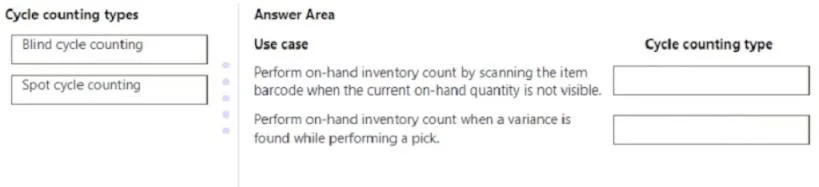
Answer Area
Drag items
Correct arrangement
- Blind cycle counting
- Spot cycle counting
Explanation
Dynamics 365 SCM Cycle Counting - Explanation
Note: The question as presented omits the actual use case descriptions (only the answer arrangement is shown). Based on the standard Microsoft exam format (MB-330), the typical use cases are reconstructed below.
Cycle Counting Types Defined
Blind Cycle Counting
Workers count inventory without being shown the system's expected on-hand quantity. The "Display item count" setting on the mobile device menu item is set to No. This eliminates anchoring bias - counters record what they physically see, not what the system expects.
Spot Cycle Counting
An ad-hoc, immediate, unscheduled count triggered for a specific item or location, typically when a discrepancy is suspected or discovered. It is not part of a recurring plan.
Why Items Go in This Arrangement
| Position | Use Case (typical exam framing) | Answer | Reason |
|---|---|---|---|
| 1 | Workers should count items without knowing the expected quantity, to avoid influencing the count | Blind cycle counting | Hiding the on-hand figure is precisely what "blind" means - it ensures unbiased physical verification |
| 2 | A manager suspects a discrepancy and needs to count a specific item immediately | Spot cycle counting | Spot counting is the ad-hoc mechanism for targeted, on-demand counts outside the normal cycle plan |
Technical Reasoning Per Placement
Blind cycle counting (Position 1)
- Configured via the mobile device menu item → set
Display item count = No - Forces workers to record actual physical quantity independently of system data
- Directly addresses the company's problem of incorrect inventory valuation by removing the bias that causes workers to match system numbers rather than count honestly
- Best for routine, scheduled counts where data integrity is the priority
Spot cycle counting (Position 2)
- Triggered on demand from within Dynamics 365 SCM (Inventory Management > Cycle counting > Spot cycle counting)
- No schedule required - reactive to a specific event or suspicion
- Counts only the targeted item/location, not a broader plan
- Best when something flags a potential discrepancy mid-operation
Common Mistakes and Misconceptions
-
Confusing "blind" with "no process" - Blind counting is a structured, scheduled count; it only removes the quantity display. It is not informal.
-
Assuming spot counting is "blind" - Spot counting may or may not hide the on-hand quantity depending on configuration; "spot" refers to timing and scope (ad-hoc, targeted), not visibility of data.
-
Thinking spot counting replaces cycle counting plans - Spot counting supplements your cycle plan; it does not replace periodic scheduled counts.
-
Overlooking the root cause fit - The scenario explicitly mentions incorrect valuation due to no proper cycle counting policy. Blind cycle counting is the answer to the policy gap (systematic, unbiased scheduled counts), while spot counting addresses the reactive gap (immediate investigation of suspected errors).
Topics
Community Discussion
No community discussion yet for this question.