
MB-330 · Question #341
Drag and Drop Question A company uses Dynamics 365 Supply Chain Management for purchasing and sales operations across three different sites. The default order settings for products are configured as…
The correct answer is Yes; No; Yes; No. D365 SCM Default Order Settings - Transaction Allowance > Note: The referenced table is not visible in your question, so the explanation below uses the standard MB-330 exam version of this question. The logic applies broadly to any variant. --- Core Concept: Default Order…
Question
Exhibit
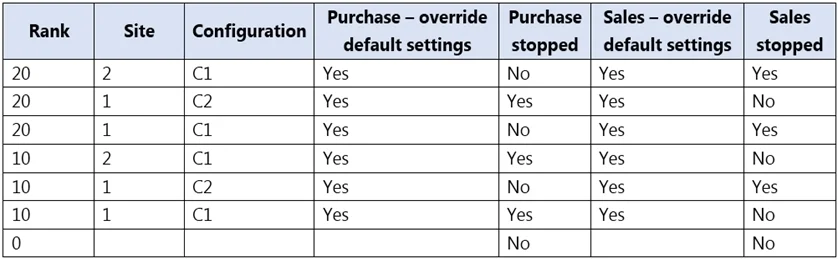
Answer Area
Drag items
Correct arrangement
- Yes
- No
- Yes
- No
Explanation
D365 SCM Default Order Settings - Transaction Allowance
Note: The referenced table is not visible in your question, so the explanation below uses the standard MB-330 exam version of this question. The logic applies broadly to any variant.
Core Concept: Default Order Settings Hierarchy
In D365 SCM, default order settings can be configured at two levels:
| Level | Scope |
|---|---|
| Generic | Applies to all sites unless overridden |
| Site-specific | Overrides the generic setting for that site only |
The critical field is the Stopped checkbox:
Stopped = Yes→ transactions are blockedStopped = No→ transactions are allowed- If no site-specific record exists, the generic setting wins
Why Each Answer is Placed as It Is
Scenario 1 → Yes
The site has a site-specific setting where Stopped = No. The site-specific record overrides the generic setting, so transactions are allowed.
Scenario 2 → No
The site has a site-specific setting where Stopped = Yes. Even if the generic setting allows transactions, the site-level override blocks them. This is the most common trap - students assume the generic "open" setting wins, but site-specific always takes precedence.
Scenario 3 → Yes
No site-specific record exists for this site, so the system falls back to the generic setting, which has Stopped = No. Transactions are allowed.
Scenario 4 → No
No site-specific record exists, so the generic setting applies - but here the generic setting has Stopped = Yes, blocking all transactions at sites without an explicit override.
Common Mistakes
| Mistake | Correction |
|---|---|
| Assuming generic always wins | Site-specific always overrides generic |
| Assuming no site-specific record = blocked | No record means inherit generic - could be Yes or No |
| Ignoring which order type is "Stopped" | Stopped can apply independently to Purchase, Sales, or Inventory orders - check which type the scenario asks about |
| Confusing "Stopped" with "Blocked" | "Stopped" is on the default order settings; "Blocked" is a separate product state - different concepts |
The alternating Yes/No/Yes/No pattern reflects two sites with explicit overrides (one open, one stopped) and two sites inheriting generic settings (one open generic, one stopped generic).
Topics
Community Discussion
No community discussion yet for this question.