
MB-310 · Question #217
Drag and Drop Question You have implemented Dynamics 365 Finance. You must implement interest fees to encourage customers to pay on time. You need to configure interest fees. Which functionality…
The correct answer is Credit note; Interest note. Dynamics 365 Finance - Interest Fee Configuration > Note: The question as provided is missing the actual scenario descriptions for positions 1 and 2. The explanation below is based on standard D365 Finance interest processing workflows and the correct answers given. --- How…
Question
Exhibit
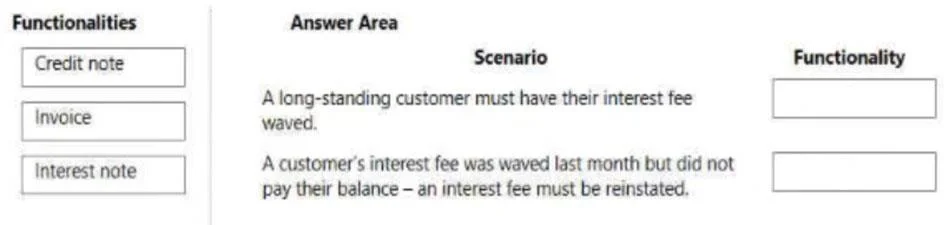
Answer Area
Drag items
Correct arrangement
- Credit note
- Interest note
Explanation
Dynamics 365 Finance - Interest Fee Configuration
Note: The question as provided is missing the actual scenario descriptions for positions 1 and 2. The explanation below is based on standard D365 Finance interest processing workflows and the correct answers given.
How Interest Fees Work in D365 Finance
The interest process flow is:
- Customer has an overdue invoice
- You run the Interest calculation process
- System generates an Interest note sent to the customer
- If interest needs to be reversed/waived, a Credit note is issued
Item Placements
Position 1 → Credit note
A credit note is used to cancel or waive an existing interest charge. If interest was calculated incorrectly, or you want to write off the charge as a customer concession, you post a credit note against the interest note. This is the reversal/cancellation mechanism - not the charging mechanism.
Position 2 → Interest note
An interest note is the output document generated when you run the interest calculation job in D365 Finance (Accounts receivable > Periodic tasks > Interest > Create interest notes). It is sent to the customer and represents the actual fee for late payment. This is the core tool for implementing interest fees.
Why "Invoice" Is Wrong
A standard invoice is the original sales document - it's what triggers the overdue condition, but it plays no role in the interest fee configuration or charging process itself. Selecting it here is the most common mistake.
Key Takeaway
| Scenario | Correct Functionality |
|---|---|
| Cancel/waive an interest charge | Credit note |
| Charge a customer interest for late payment | Interest note |
The "Invoice" option is a distractor - it precedes interest calculation but is not part of configuring or applying interest fees.
Topics
Community Discussion
No community discussion yet for this question.