
MB-310 · Question #208
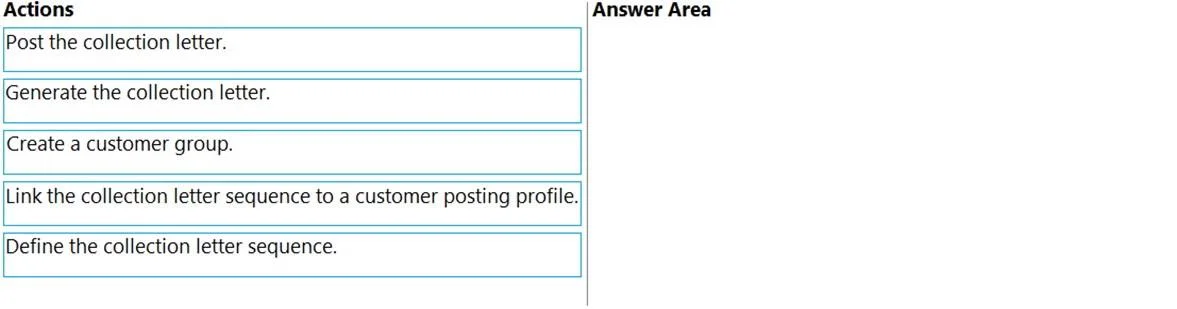
Drag and Drop Question You manage customer credit and collections in a Dynamics 365 Finance implementation. At the beginning of each month, you must send collection letters to customers whose…
The correct answer is Define the collection letter sequence.; Link the collection letter sequence to a customer posting profile.; Post the collection letter.; Generate the collection letter. Dynamics 365 Finance - Collection Letter Configuration Overview Collection letters in D365 Finance require two phases: setup/configuration (steps 1–2) and operational processing (steps 3–4). The distractor here is "Create a customer group" - customer groups are a separate AR…
Question
Exhibit
Answer Area
Drag items
Correct arrangement
- Define the collection letter sequence.
- Link the collection letter sequence to a customer posting profile.
- Post the collection letter.
- Generate the collection letter.
Explanation
Dynamics 365 Finance - Collection Letter Configuration
Overview
Collection letters in D365 Finance require two phases: setup/configuration (steps 1–2) and operational processing (steps 3–4). The distractor here is "Create a customer group" - customer groups are a separate AR concept unrelated to collection letter configuration.
Step-by-Step Breakdown
1. Define the collection letter sequence This is the mandatory first step. The sequence (found under Accounts Receivable > Setup > Collection letter sequence) defines the escalation ladder: how many letters exist (e.g., Letter 1, Letter 2, Final Notice), the minimum number of days between each level, any fees to charge, and the text/notes per level. Nothing else can be configured until this foundation exists.
2. Link the collection letter sequence to a customer posting profile Customer posting profiles control how customer transactions post to the ledger - and critically, they also control which collection letter sequence applies to which customer segment. You cannot link a sequence that doesn't yet exist, which is why step 1 must precede this. This step determines which customers will receive letters and which escalation path they follow.
3. Post the collection letter In D365F, the "Post" action finalizes and commits the collection letter records in the system - it applies any configured fees to the customer account and locks the letter at its current escalation level.
4. Generate the collection letter The "Generate" (or "Create collection letters") periodic task (Accounts Receivable > Periodic tasks > Collection letters) produces the actual letter documents for printing or sending.
Common Misconceptions
Steps 3 and 4 appear reversed relative to standard D365 Finance documentation and real-world workflow.
In practice, the standard D365F operational sequence is:
- Generate (create the proposal/draft)
- Post (finalize and apply fees)
If your exam source lists Post before Generate, treat it as a known quirk of that question set. The setup order (steps 1 → 2) is unambiguously correct.
Other common mistakes:
- Including "Create a customer group" - this is the distractor. Customer groups exist for segmentation/reporting, not collection letter routing.
- Reversing steps 1 and 2 - you cannot assign a sequence to a posting profile before the sequence exists.
- Skipping the posting profile link entirely - without it, no customers are associated with a sequence and no letters are triggered.
Topics
Community Discussion
No community discussion yet for this question.