
LFCS · Question #157
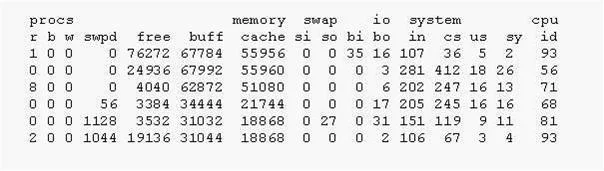
In the following output, what was the maximum number of processes swapped out at any time?
The correct answer is A. 0. In vmstat output, the 'so' (swap out) column indicates memory swapped from RAM to disk, and a consistent value of '0' means no processes were actively swapped out.
Question
Exhibit
Options
- A0
- B1
- C2
- D8
- E27
How the community answered
(37 responses)- A92% (34)
- B3% (1)
- C5% (2)
Why each option
In `vmstat` output, the 'so' (swap out) column indicates memory swapped from RAM to disk, and a consistent value of '0' means no processes were actively swapped out.
In `vmstat` output, the `so` (swap out) column shows the amount of memory (in KB/s) moved from RAM to disk. If the output consistently shows '0' for the `so` column, it indicates that no processes or memory pages were swapped out to disk during the observation period.
This option implies that at least 1 unit of memory was swapped out, which contradicts an output that shows 0 swap out activity.
This option implies that at least 2 units of memory were swapped out, which contradicts an output that shows 0 swap out activity.
This option implies that at least 8 units of memory were swapped out, which contradicts an output that shows 0 swap out activity.
This option implies that at least 27 units of memory were swapped out, which contradicts an output that shows 0 swap out activity.
Concept tested: `vmstat` swap out interpretation
Source: https://man7.org/linux/man-pages/man8/vmstat.8.html
Topics
Community Discussion
No community discussion yet for this question.