
Juniper
JN0-696 · Question #9
Click the Exhibit button. Your company has a Web server in the trust zone. You configure a NAT rule to allow Internet users from the untrust zone to access this Web server. Internet users use the…
The correct answer is D. set security address-book global address web-server 192.168.1.11/32. DNAT is first, followed by Policy look-up.
Troubleshooting NAT
Question
Click the Exhibit button. Your company has a Web server in the trust zone. You configure a NAT rule to allow Internet users from the untrust zone to access this Web server. Internet users use the public IP address 70.1.1.1 to access this Web server, but they report that the server is not accessible. Referring to the exhibit, which configuration change would resolve this problem?
Exhibit
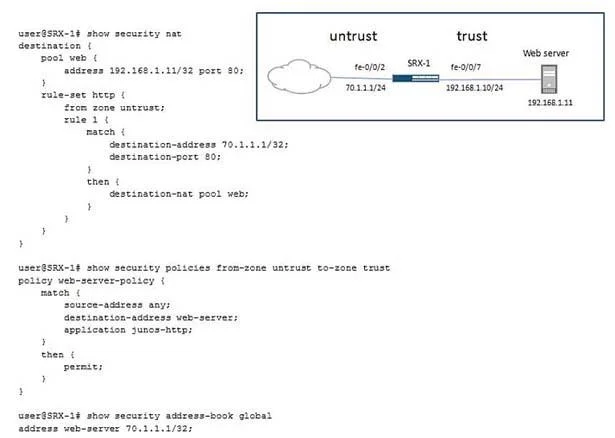
Options
- Aset security nat proxy-arp interface fe-0/0/2 address 70.1.1.0/24
- Bset security zones security-zone untrust host-inbound-traffic system-services http
- Cset security nat destination rule-set http rule 1 match source-address 0.0.0.0/0
- Dset security address-book global address web-server 192.168.1.11/32
How the community answered
(27 responses)- A15% (4)
- B4% (1)
- C4% (1)
- D78% (21)
Explanation
DNAT is first, followed by Policy look-up.
Topics
#destination NAT#proxy-ARP#address book#web server access
Community Discussion
No community discussion yet for this question.