
JN0-696 · Question #50
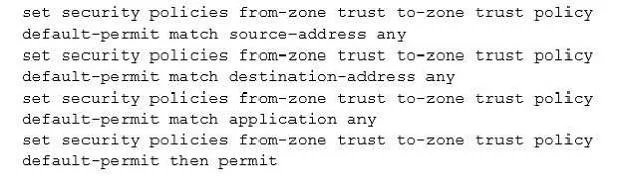
Click the Exhibit button. A customer created a security policy and is not receiving any logs from permitted sessions, you are asked to obtain the logs for the customer. Which parameter must you add…
The correct answer is A. set system syslog file traffic-log any any. To send security policy logs to a file named traffic-log on the SRX Series device: user@host# set system syslog file traffic-log any any user@host# set system syslog file traffic-log match "RT_FLOW_SESSION" In the example above, traffic log messages are sent to a separate log…
Question
Click the Exhibit button. A customer created a security policy and is not receiving any logs from permitted sessions, you are asked to obtain the logs for the customer. Which parameter must you add to the configuration shown in the exhibit to accomplish this task?
Exhibit
Options
- Aset system syslog file traffic-log any any
- Bset default-permit then log session-close
- Cset default-permit then count
- Dset system syslog file traffic-log match "traffic_session".
How the community answered
(44 responses)- A82% (36)
- B11% (5)
- C5% (2)
- D2% (1)
Explanation
To send security policy logs to a file named traffic-log on the SRX Series device: user@host# set system syslog file traffic-log any any user@host# set system syslog file traffic-log match "RT_FLOW_SESSION" In the example above, traffic log messages are sent to a separate log file named traffic-log. The severity level is set to any so that the traffic log messages are captured. Only log messages that match RT_FLOW_SESSION, which identifies traffic log messages, are sent to the traffic-log
Topics
Community Discussion
No community discussion yet for this question.