
JN0-696 · Question #16
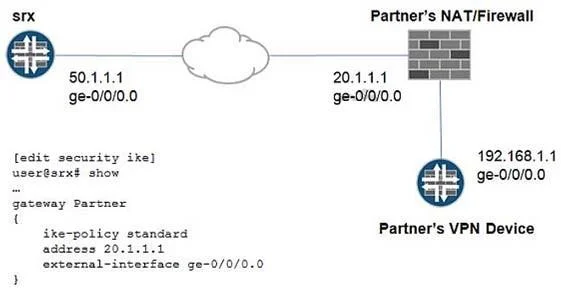
Click the Exhibit button. You have created a new VPN tunnel to your partner's site but IKE Phase 1 is not coming up. You check the trace log and find the following log message: Jun [IKED 2]…
The correct answer is B. set remote-identity inet 192.168.1.1. You stablish the tunnel against a public IP of a firewall, which maps NAT to the private IP. The address is right, as you never been able to reach a private IP address through the internet. You need to stablish the tunnel with the private IP, so the remote address command is…
Question
Click the Exhibit button. You have created a new VPN tunnel to your partner's site but IKE Phase 1 is not coming up. You check the trace log and find the following log message:
Jun [IKED 2] iked_pm_id_validate id NOT matched. Considering the topology and the SRX Series device's configuration shown in the exhibit, which modification is needed under [edit security gateway Partner]?
Exhibit
Options
- Arename address 20.1.1.1 to address 192.168.1.1
- Bset remote-identity inet 192.168.1.1
- Cset local-identity inet 20.1.1.1
- Dset local-identity inet 50.1.1.1
How the community answered
(25 responses)- A8% (2)
- B84% (21)
- C4% (1)
- D4% (1)
Explanation
You stablish the tunnel against a public IP of a firewall, which maps NAT to the private IP. The address is right, as you never been able to reach a private IP address through the internet. You need to stablish the tunnel with the private IP, so the remote address command is the right
Topics
Community Discussion
No community discussion yet for this question.