
Juniper
JN0-663 · Question #230
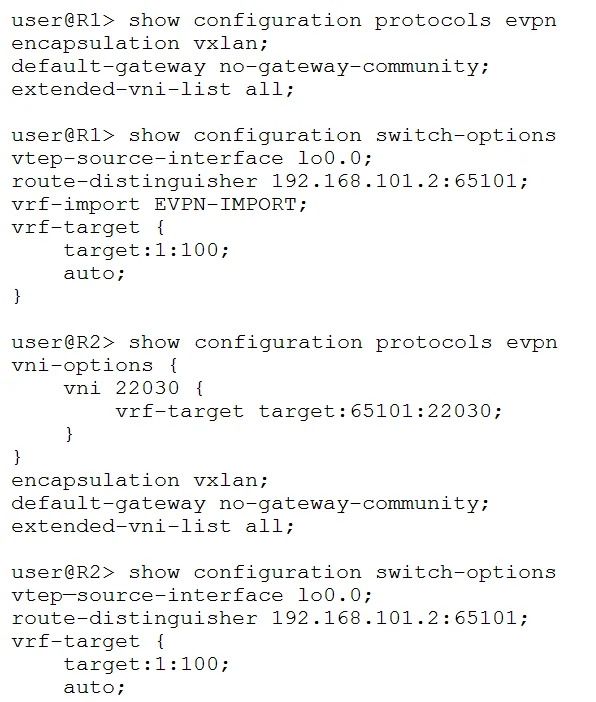
You are using EVPN to provide Layer 2 stretched VLANs between two sites. You notice that the MAC addresses in either site are not showing up on the remote site. Referring to the exhibit, what are…
Sign in or unlock JN0-663 to reveal the answer and full explanation for question #230. The question stem and answer options stay visible for context.
Question
You are using EVPN to provide Layer 2 stretched VLANs between two sites. You notice that the MAC addresses in either site are not showing up on the remote site. Referring to the exhibit, what are two ways to solve this problem? (Choose two )
Exhibit
Options
- AOn R1, issue the set switch-options vrf-target target:65101:22030 command.
- BOn R2, issue the delete protocols evpn vni-options vni 22030 command.
- COn R1, issue the set protocols evpn vni-options vni 22030 vrf-target target :65101:22030
- DOn R2, issue the set switch-options vrf-target target:65101:22030 command.
Unlock JN0-663 to see the answer
You've previewed enough free JN0-663 questions. Unlock JN0-663 for full answers, explanations, the timed quiz mode, progress tracking, and the master PDF. Question stem and options stay visible so you can still see what's on the exam.