
Juniper
JN0-637 · Question #38
You are troubleshooting a new IPsec VPN that is configured between your corporate office and the RemoteSite1 SRX Series device. The VPN is not currently establishing. The RemoteSite1 device is being…
Sign in or unlock JN0-637 to reveal the answer and full explanation for question #38. The question stem and answer options stay visible for context.
Site-to-Site and Remote Access VPNs
Question
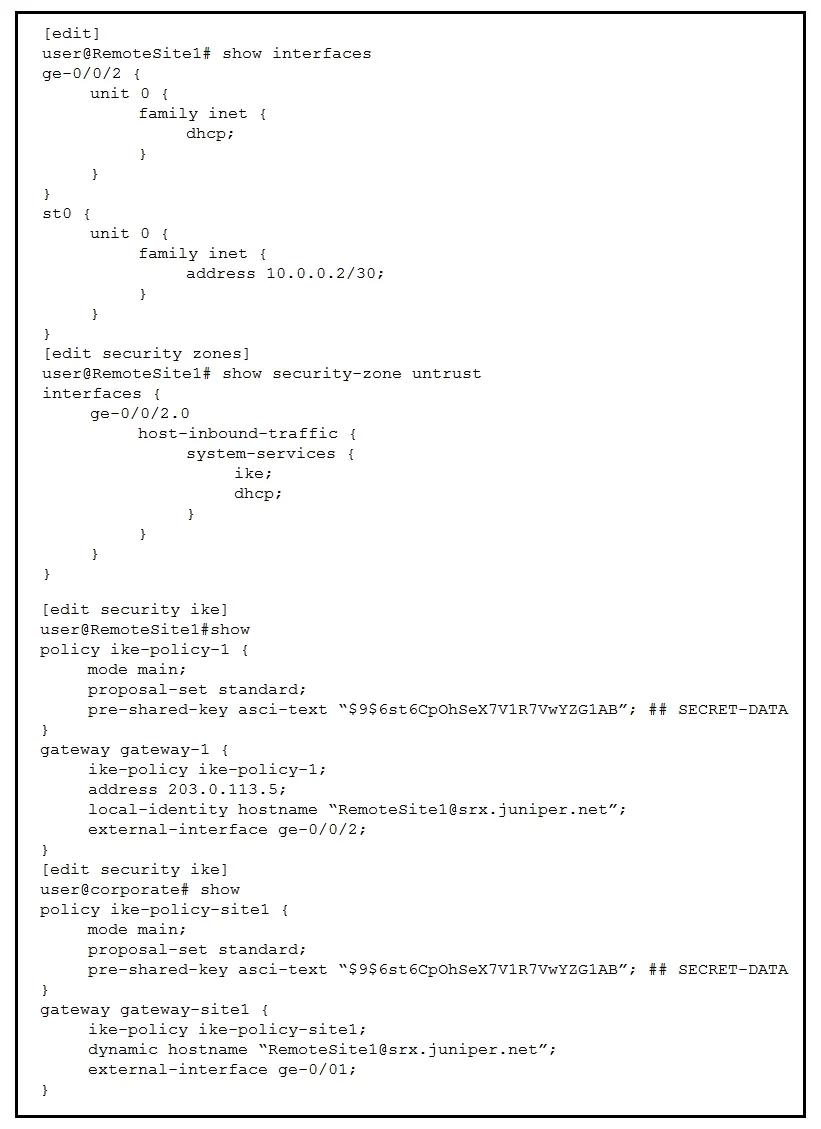
You are troubleshooting a new IPsec VPN that is configured between your corporate office and the RemoteSite1 SRX Series device. The VPN is not currently establishing. The RemoteSite1 device is being assigned an IP address on its gateway interface using DHCP. Referring to the exhibit, which action will solve this problem?
Exhibit
Options
- AOn the RemoteSite1 device, change the IKE gateway external interface to st0.0.
- BOn both devices, change the IKE version to use version 2 only.
- COn both devices, change the IKE policy proposal set to basic.
- DOn both devices, change the IKE policy mode to aggressive.
Unlock JN0-637 to see the answer
You've previewed enough free JN0-637 questions. Unlock JN0-637 for full answers, explanations, the timed quiz mode, progress tracking, and the master PDF. Question stem and options stay visible so you can still see what's on the exam.
Topics
#IPsec VPN#IKE aggressive mode#DHCP#VPN troubleshooting