
Juniper
JN0-635 · Question #86
Click the Exhibit button. While configuring the SRX345, you review the MACsec connection between devices and note that it is not working. Referring to the exhibit, which action would you use to…
Sign in or unlock JN0-635 to reveal the answer and full explanation for question #86. The question stem and answer options stay visible for context.
Layer 2 Security
Question
Click the Exhibit button. While configuring the SRX345, you review the MACsec connection between devices and note that it is not working. Referring to the exhibit, which action would you use to identify problem?
Exhibit
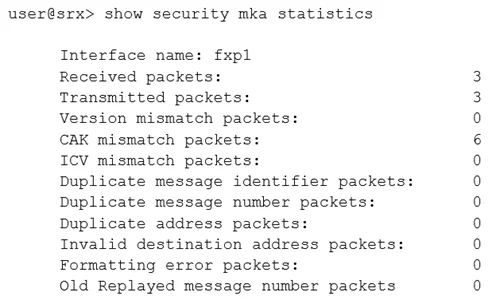
Options
- AVerify that the formatting settings are correct between the devices and that the software supports
- BVerify that the connectivity association key and the connectivity association key name match on
- CVerify that the transmission path is not replicating packets or correcting frame check sequence
- DVerify that the interface between the two devices is up and not experiencing errors
Unlock JN0-635 to see the answer
You've previewed enough free JN0-635 questions. Unlock JN0-635 for full answers, explanations, the timed quiz mode, progress tracking, and the master PDF. Question stem and options stay visible so you can still see what's on the exam.
Topics
#MACsec#connectivity association key#CAK troubleshooting#CKN mismatch