
JN0-632 · Question #120
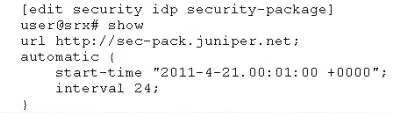
Click the Exhibit button. Senior management reports that your company's network is being attacked by hackers exploiting a recently announced vulnerability. The attack is not being detected by the DP…
The correct answer is B. Enable the automatic updates by adding set automatic enable to the configuration and commit the change. See the full explanation below for the reasoning.
Question
Click the Exhibit button. Senior management reports that your company's network is being attacked by hackers exploiting a recently announced vulnerability. The attack is not being detected by the DP on your SRX Series device. You suspect that your attack database is out of date. You check the version of the attack database and discover it is several weeks old. You configured your device to download updates automatically as shown in the exhibit. What must you do for the automatic update to function properly?
Exhibit
Options
- AChange the interval to daily by adding set automatic interval 1 to the configuration and commit the change.
- BEnable the automatic updates by adding set automatic enable to the configuration and commit the change.
- CSet the time zone on your device.
How the community answered
(68 responses)- A7% (5)
- B72% (49)
- C21% (14)
Community Discussion
No community discussion yet for this question.