
JN0-481 · Question #7
The same connectivity template is applied to the ge-0/0/6 interface on both borderleaf1 and borderleaf2 nodes. This connectivity template describes the intended configuration of the EBGP session…
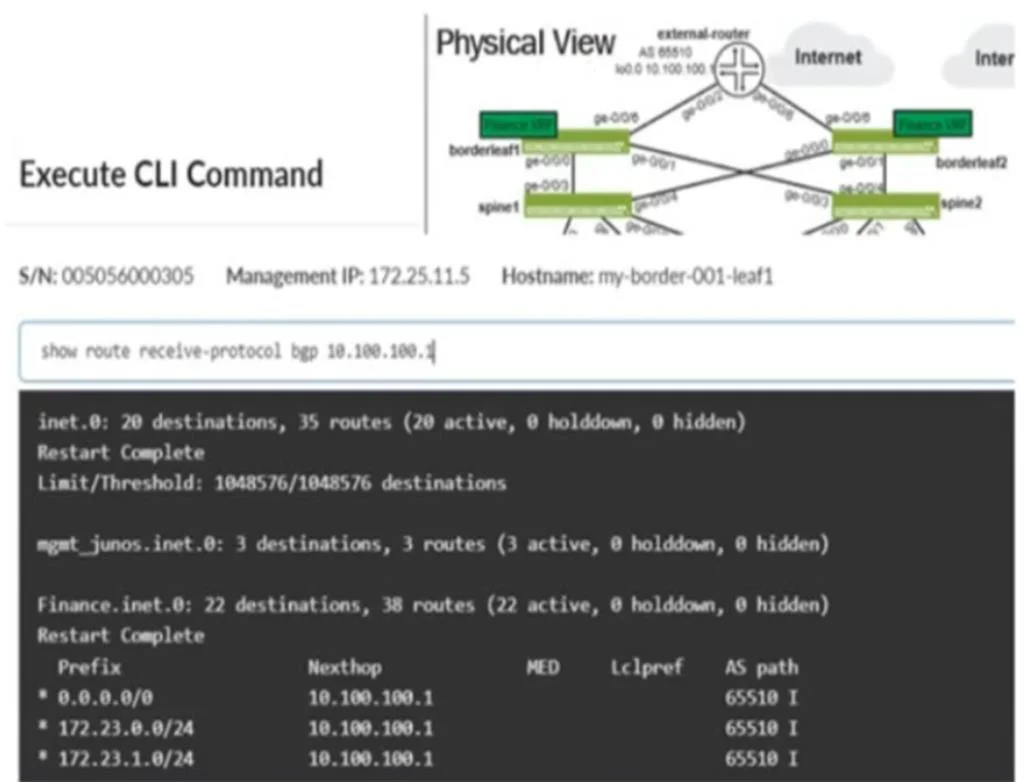
The correct answer is B. Modify the import policy to only allow the default route. The exhibit shows that the border leaf is receiving multiple routes (including 172.23.x/24) from the external router via EBGP. To prevent these specific routes from being installed in the Finance routing table, you must modify the import policy applied to the EBGP session so…
Question
The same connectivity template is applied to the ge-0/0/6 interface on both borderleaf1 and borderleaf2 nodes. This connectivity template describes the intended configuration of the EBGP session between each of the borderleaf nodes and the external router. You want to ensure that the 172.23.x/24 routes are not installed in the borderleaf nodes' Finance routing table. Referring to the exhibit, what would you change in Juniper Apstra to accomplish this task?
Exhibit
Options
- AAdd an aggregate prefix to the routing policy.
- BModify the import policy to only allow the default route.
- CSelect the "Expect Default IPv4 Route" checkbox.
- DModify the export policy to only allow the default route.
How the community answered
(56 responses)- A5% (3)
- B79% (44)
- C4% (2)
- D13% (7)
Explanation
The exhibit shows that the border leaf is receiving multiple routes (including 172.23.x/24) from the external router via EBGP. To prevent these specific routes from being installed in the Finance routing table, you must modify the import policy applied to the EBGP session so that only the default route (0.0.0.0/0) is permitted. This ensures the border leaf nodes accept only the intended default route and deny the 172.23.x/24 prefixes.
Topics
Community Discussion
No community discussion yet for this question.