
JN0-481 · Question #64
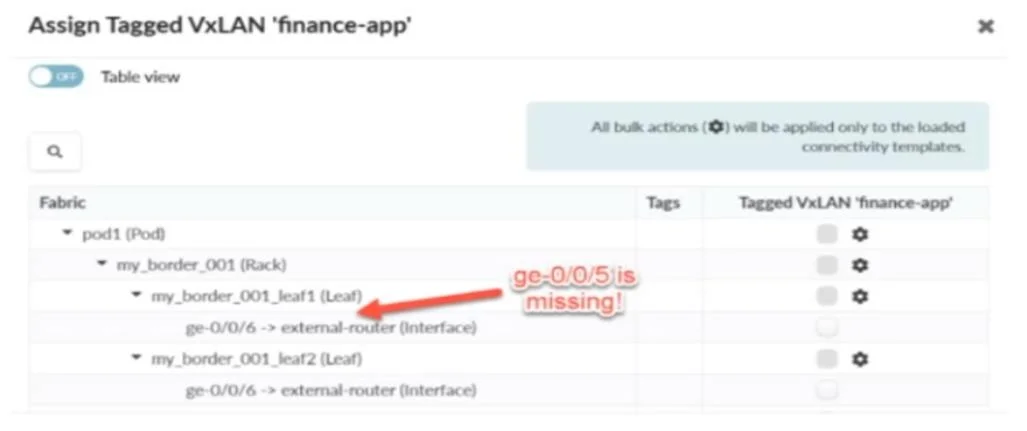
You are attempting to attach the server connected to the my_border_001_leaf1 node's ge- 0/0/5 interface to the finance-app virtual network. Referring to the exhibit, what would you do to solve the…
The correct answer is A. You can add a generic system to the physical topology. The ge-0/0/5 interface is missing from the Tagged VxLAN assignment list, which indicates that Apstra does not recognize a system (such as a server or appliance) connected to that port. In Juniper Apstra, to enable a virtual network to be attached to a specific interface, that…
Question
You are attempting to attach the server connected to the my_border_001_leaf1 node's ge- 0/0/5 interface to the finance-app virtual network. Referring to the exhibit, what would you do to solve the problem?
Exhibit
Options
- AYou can add a generic system to the physical topology.
- BYou can set the generic system to the deploy mode.
- CYou can allocate an IP pool resource to the virtual network.
- DYou can assign the finance-app virtual network to the my_border_001_leaf1 node.
How the community answered
(34 responses)- A85% (29)
- B3% (1)
- C3% (1)
- D9% (3)
Explanation
The ge-0/0/5 interface is missing from the Tagged VxLAN assignment list, which indicates that Apstra does not recognize a system (such as a server or appliance) connected to that port. In Juniper Apstra, to enable a virtual network to be attached to a specific interface, that interface must be associated with a known endpoint - typically a Generic System. By adding a Generic System to the physical topology and mapping it to ge-0/0/5, Apstra will recognize that interface as a valid target for virtual network connectivity templates, such as the one for finance-app.
Topics
Community Discussion
No community discussion yet for this question.