
JN0-481 · Question #50
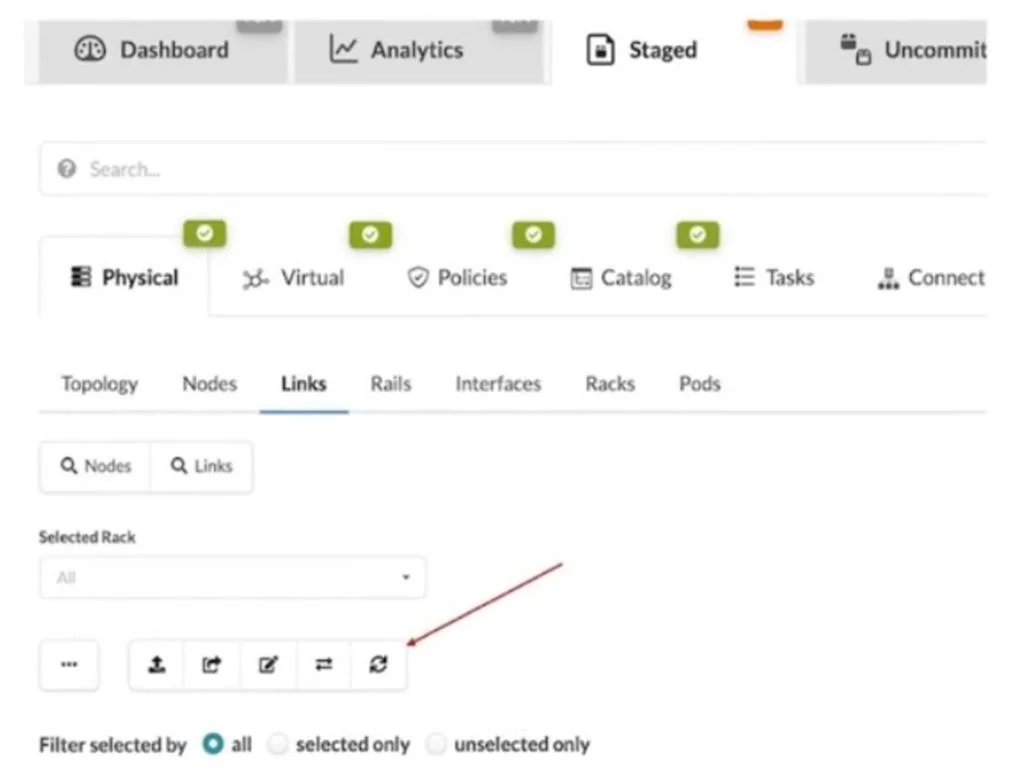
What does clicking the indicated icon shown in the exhibit accomplish?
The correct answer is B. It fetches the discovered Link Layer Discovery Protocol (ChooseLLDP) data. In the Juniper Apstra Staged -> Physical -> Links view, clicking the indicated refresh-style icon fetches the most recent LLDP (Link Layer Discovery Protocol) data. This updates the cable map with the latest discovered physical connectivity information from the devices.
Question
What does clicking the indicated icon shown in the exhibit accomplish?
Exhibit
Options
- AIt refreshes the screen.
- BIt fetches the discovered Link Layer Discovery Protocol (ChooseLLDP) data.
- CIt erases the entire cable map to start over.
- DIt changes the speed of existing links.
How the community answered
(54 responses)- A2% (1)
- B91% (49)
- C2% (1)
- D6% (3)
Explanation
In the Juniper Apstra Staged -> Physical -> Links view, clicking the indicated refresh-style icon fetches the most recent LLDP (Link Layer Discovery Protocol) data. This updates the cable map with the latest discovered physical connectivity information from the devices.
Topics
Community Discussion
No community discussion yet for this question.