
JN0-481 · Question #46
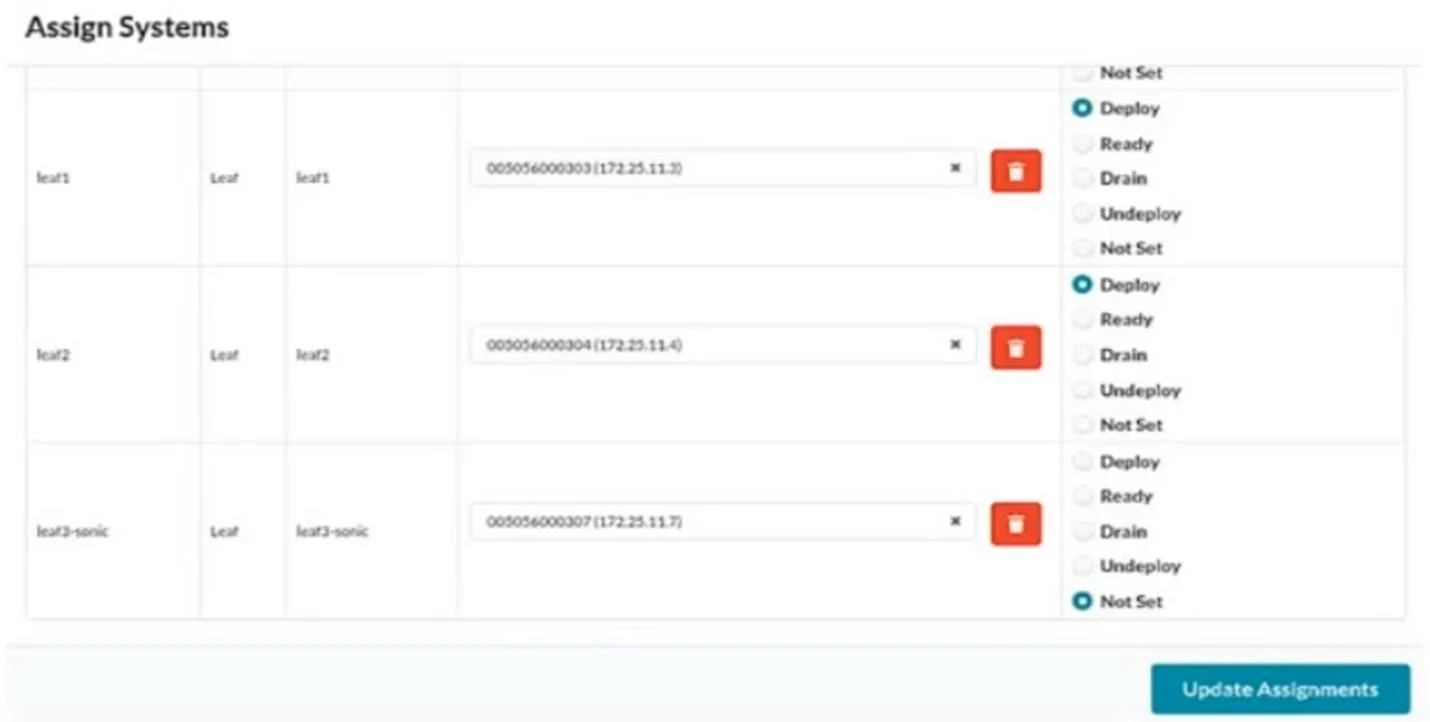
You have created a blueprint and are in the process of assigning systems. You require the leaf3- sonic device in the blueprint but do not want it to actively participate in the routing of the IP…
The correct answer is A. Drain B. Ready. Drain mode keeps the device assigned to the blueprint but prevents it from forwarding or participating in routing, which satisfies the requirement. Ready mode means the device is assigned and recognized in the blueprint but not yet deployed, so it does not actively participate…
Question
You have created a blueprint and are in the process of assigning systems. You require the leaf3- sonic device in the blueprint but do not want it to actively participate in the routing of the IP fabric. In the Juniper Apstra UI, which two modes satisfy this requirement? (Choose two.)
Exhibit
Options
- ADrain
- BReady
- CDeploy
- DUndeploy
How the community answered
(38 responses)- A74% (28)
- C18% (7)
- D8% (3)
Explanation
Drain mode keeps the device assigned to the blueprint but prevents it from forwarding or participating in routing, which satisfies the requirement. Ready mode means the device is assigned and recognized in the blueprint but not yet deployed, so it does not actively participate in fabric routing.
Topics
Community Discussion
No community discussion yet for this question.