
JN0-481 · Question #33
Referring to the exhibit, what happens when an operator clicks the Accept Changes button on the right side of the screen in Juniper Apstra?
The correct answer is B. Apstra will incorporate the new CLI into the "golden config". In Juniper Apstra, the Accept Changes button is used when the running configuration on a device has been manually modified outside of Apstra's intent-based automation. Clicking Accept Changes reconciles these differences by updating Apstra's "golden config" to include the CLI…
Question
Referring to the exhibit, what happens when an operator clicks the Accept Changes button on the right side of the screen in Juniper Apstra?
Exhibit
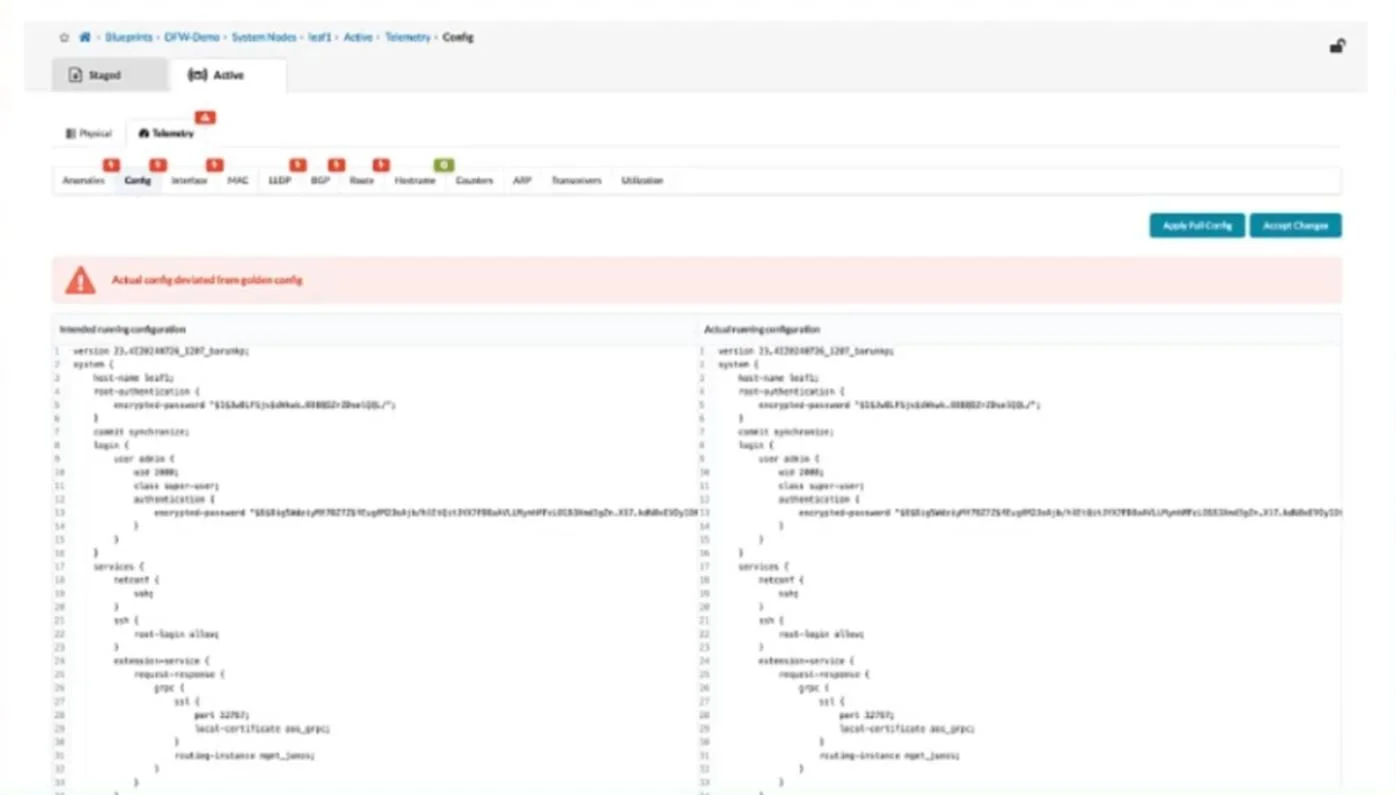
Options
- AApstra will add a similar configuration from a known device context to accomplish the goal of the
- BApstra will incorporate the new CLI into the "golden config".
- CApstra will not commit new changes to this device until the user clicks the Apply Full Config button.
- DApstra will stop warning about the changes, but the changes will be overwritten at the next commit.
How the community answered
(68 responses)- A6% (4)
- B79% (54)
- C3% (2)
- D12% (8)
Explanation
In Juniper Apstra, the Accept Changes button is used when the running configuration on a device has been manually modified outside of Apstra's intent-based automation. Clicking Accept Changes reconciles these differences by updating Apstra's "golden config" to include the CLI- entered changes, ensuring that Apstra's intended state matches the actual device configuration. This way, Apstra will stop flagging the deviation as a mismatch.
Topics
Community Discussion
No community discussion yet for this question.