nerdexam
Juniper

JN0-460 · Question #70

Referring to the exhibit, what is the purpose of the Save button in the upper-right corner of the Mist dashboard?

The correct answer is D. It applies the port configuration changes to the switch. In the Juniper Mist AI for Wired dashboard, administrators can select one or more switch ports (as shown in the exhibit, e.g., port ge-0/0/25 on an EX4100-48MP). Once configuration changes are made -- such as VLAN assignment, port profiles, PoE settings, or administrative state…

Mist AI Wired Deployment

Question

Referring to the exhibit, what is the purpose of the Save button in the upper-right corner of the Mist dashboard?

Exhibit
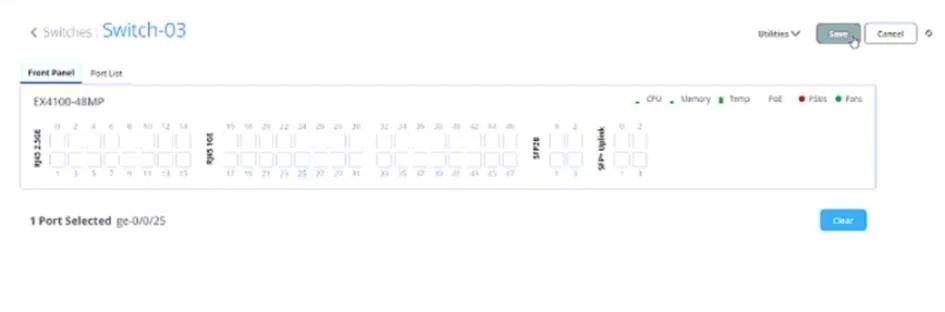
JN0-460 question #70 exhibit

Options

  • AIt generates a backup of the current port configuration.
  • BIt resets the port configuration to its default settings.
  • CIt previews the impact of the port configuration changes before applying them.
  • DIt applies the port configuration changes to the switch.

How the community answered

(25 responses)
  • A
    8% (2)
  • B
    4% (1)
  • C
    4% (1)
  • D
    84% (21)

Explanation

In the Juniper Mist AI for Wired dashboard, administrators can select one or more switch ports (as shown in the exhibit, e.g., port ge-0/0/25 on an EX4100-48MP). Once configuration changes are made -- such as VLAN assignment, port profiles, PoE settings, or administrative state -- the Save button must be clicked to confirm and apply those changes to the device. "When making configuration changes in the Mist switch interface, the Save button must be used to confirm the modifications. Clicking Save applies the selected port settings to the switch through Mist Cloud." Option A is incorrect: saving does not create a backup. Backups and snapshots are handled through Mist's configuration archive, not via the Save button. Option B is incorrect: Save does not reset configuration; instead, it commits changes. Option C is incorrect: there is no preview function tied to Save. Option D is correct: the Save button is explicitly for applying configuration changes to the selected switch or port(s).

Topics

#Mist dashboard#port configuration#switch management#UI navigation

Community Discussion

No community discussion yet for this question.

Full JN0-460 Practice