
JN0-452 · Question #21
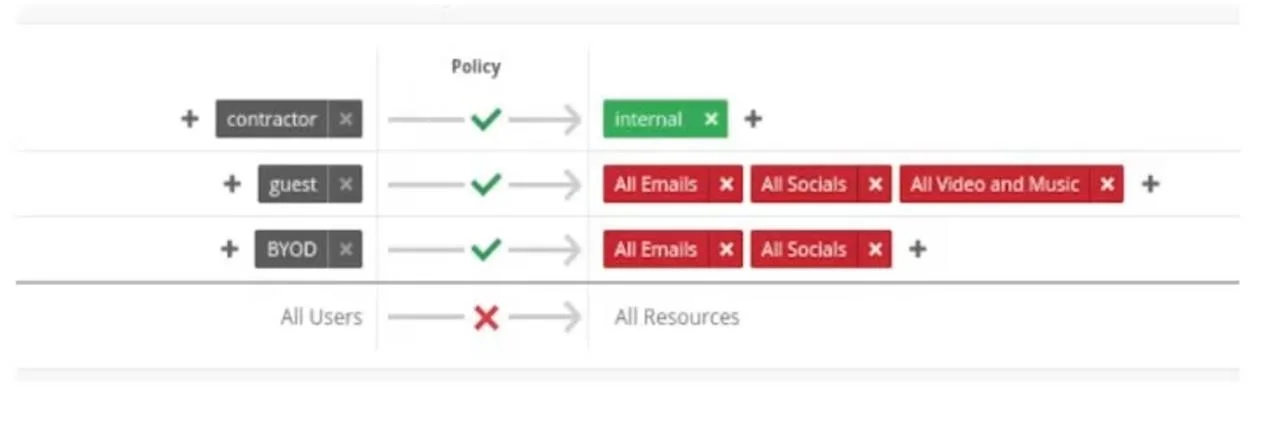
Click the Exhibit button. Your colleagues report that they are unable to browse tutorials needed for work located at youtube.com when using their BYOD devices. When using a guest device, they are…
The correct answer is D. Move the WxLAN policy for BYOD above the policy for guests. WxLAN policies are evaluated top-down, so the BYOD policy must be placed above the guest policy. Currently, BYOD is being restricted by the rules that block "All Video and Music" (including YouTube). Reordering ensures BYOD users get the intended access while guests remain
Question
Click the Exhibit button. Your colleagues report that they are unable to browse tutorials needed for work located at youtube.com when using their BYOD devices. When using a guest device, they are able to access youtube.com. In this scenario, how would you allow BYOD colleagues to access youtube.com using the WxLAN policies?
Exhibit
Options
- ADelete the WxLAN policy for guests and add the guest label to the policy for BYOD.
- BMove the WxLAN policy for guests above the policy for contractor.
- CDelete the WxLAN policy for BYOD and add the BYOD label to the policy for guests.
- DMove the WxLAN policy for BYOD above the policy for guests.
How the community answered
(23 responses)- A9% (2)
- B4% (1)
- C13% (3)
- D74% (17)
Explanation
WxLAN policies are evaluated top-down, so the BYOD policy must be placed above the guest policy. Currently, BYOD is being restricted by the rules that block "All Video and Music" (including YouTube). Reordering ensures BYOD users get the intended access while guests remain
Topics
Community Discussion
No community discussion yet for this question.